
Introduction
The author has previously written an article "WeChat Payment Accessing the Partner Model" (Portal:mp.weixin.qq.com/s/9XFh_TWzu…), today I just had the opportunity to completely operate the Alipay access process based on the partner model (also called the service provider model), and record it completely.
The difference between Alipay's service provider model and ordinary merchant model is similar to that of WeChat. The entire payment collection process is that the service provider's application initiates a payment request and collects payment on behalf of the merchant. Finally, the funds are directly transferred to the merchant's account.
The benefits of choosing the service provider model are all-round compared to ordinary merchants. In addition to lower rates, or the ability to apply for lower rates, it is a burden reduction operation for both merchants and service providers.
For service providers, you can directly create third-party applications on your own service provider's open platform, and manage the public and private keys, gateway addresses, etc. yourself. After the configuration is completed, you only need to invite the designated merchant for authorization, eliminating the trouble of repeatedly communicating with the merchant;
For merchants, they only need to communicate with the service provider in advance according to actual needs which services need to be activated, such as which payment method, whether to log in with Alipay, and whether to do some red envelope and other services. Then the service provider will check the corresponding permissions when initiating authorization according to the merchant's needs, and the merchant can activate it according to the actual situation.
All related operations introduced in this article are based on the official documents provided by Alipay. Although we are in the AI era and the process of connecting to payment products is relatively mature, there is still a threshold for those who have not yet operated such products, because the development process is actually very simple and there are many ready-made solutions and ideas. If you do not have a panoramic understanding of connecting to payment products, you will still be confused when you start to do it.
This article will take a third-party application that has opened a "order code" payment permission as an example, and talk about it from the preparation stage to the development and launch.
Preparation
Note that the preparation stage here refers to the process of officially starting to access Alipay, configuring public and private keys, etc. If it is the development stage, there is no need to wait for this step to be completed first. You can use the sandbox environment provided by Alipay to run the functions first, and finally the configuration is ok. Due to space limitations, this article will not introduce too much content related to Alipay sandbox.
Service providers
Note that although the title of this section is "Service Provider Aspects", most operations are completed on the open platform. However, from the user's perspective, I am a software provider, so I open and operate the development platform in the role of a service provider. I believe that my friends can generally understand the operation here.
Registrar
The first step is to register your development team as a service provider according to the service provider platform entry rules:p.alipay.com/page/settle…. This step is to operate on the official website and follow the instructions to complete it, so I won’t go into details.
Note: Even if your product is self-developed, it is completely OK to use the service provider model, and the rates may be lower and cost-saving. Applications are managed centrally on the service provider's console, and merchants are managed on the merchant platform. If your payment products are mature enough to provide external services, they will be managed on the service provider's console, and then the merchants will be guided to complete the authorization operations.
Create app
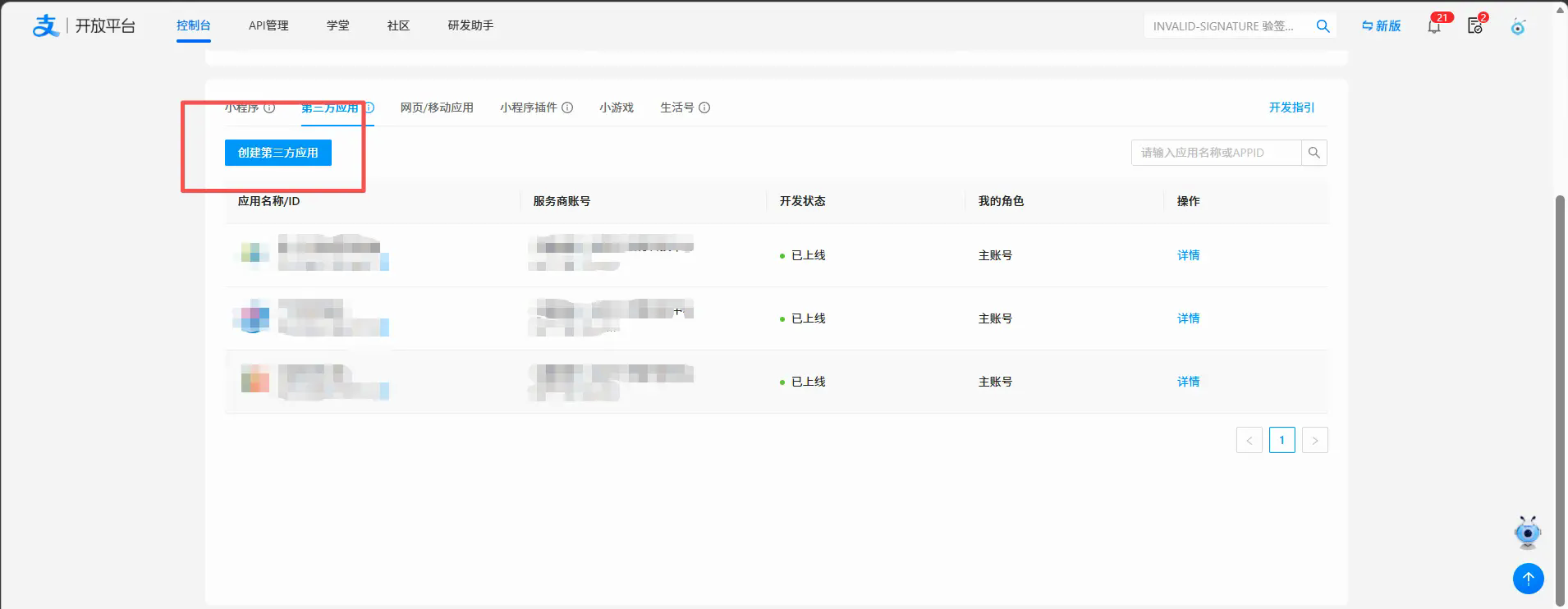
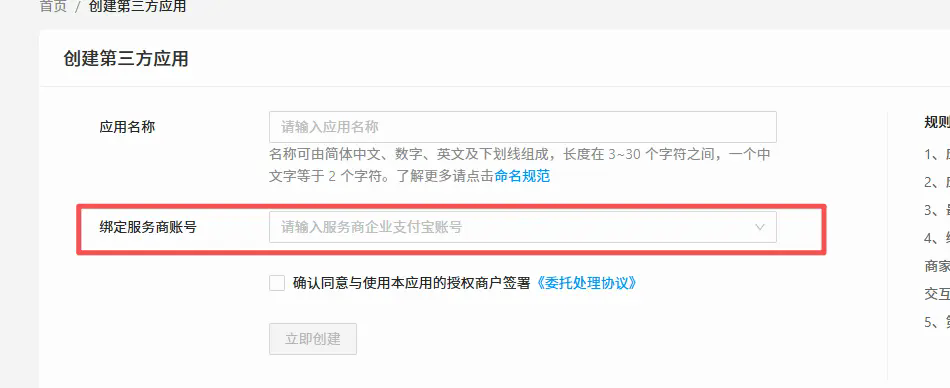
After logging in to the open platform, create a third-party application, fill in an appropriate name (note that it is named according to the naming convention, otherwise the review will not pass), and bind the service provider account.
Development settings
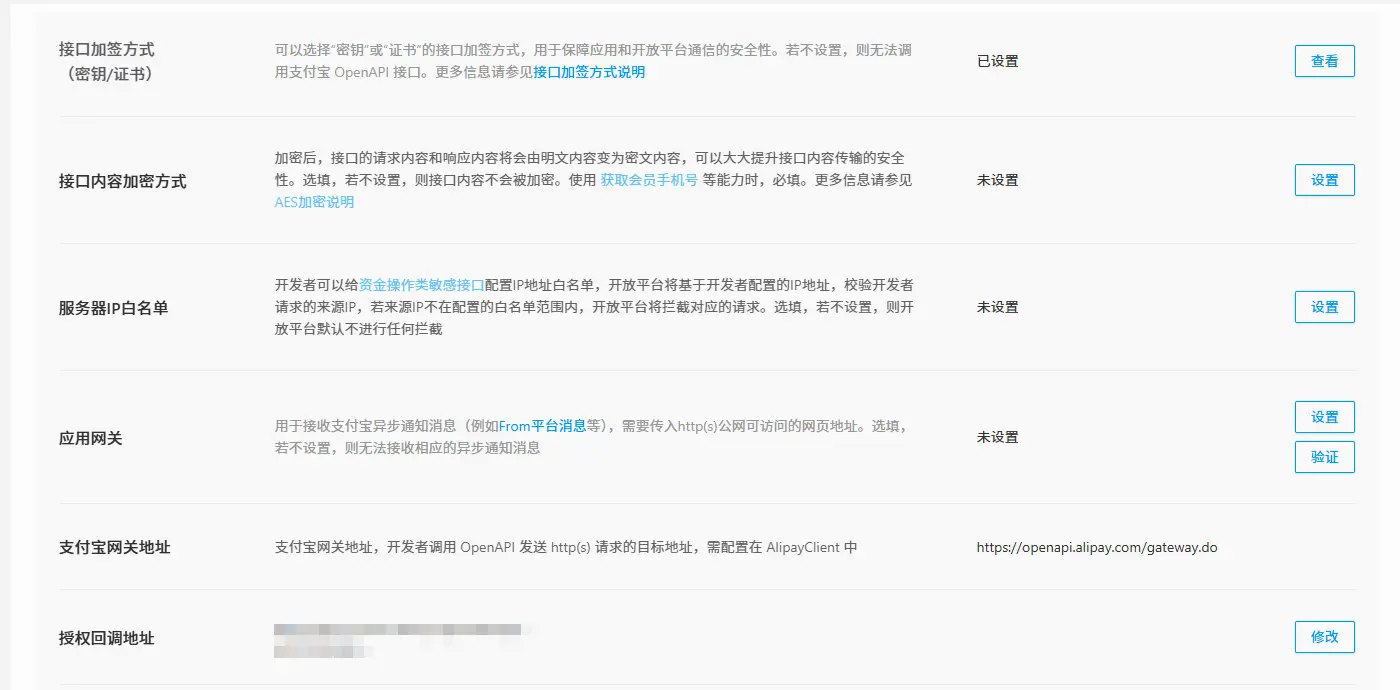
After creating the application, the platform will ask to create development information. The interface signing method needs to be configured no matter which method the application is created. The authorization callback address requires additional configuration for the service provider mode. Others are optional.
In the early development stage, it is recommended to do minimal configuration first, and then improve it after running through the development process, such as server IP whitelist, interface content encryption method, etc. You can configure it as needed. Note that after the interface content is encrypted, when you accept the information Alipay calls back to you at the code level, you must also perform corresponding operations. This step does not require too much mental burden, just one more layer of processing, and has no impact on the business code (Document:opendocs.alipay.com/common/02ms…)
Signing method
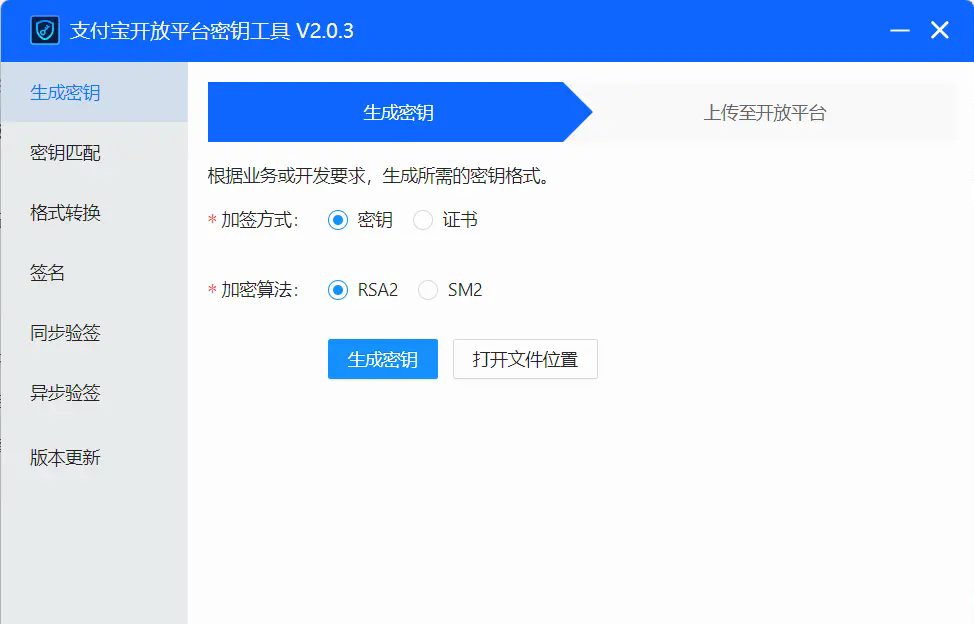
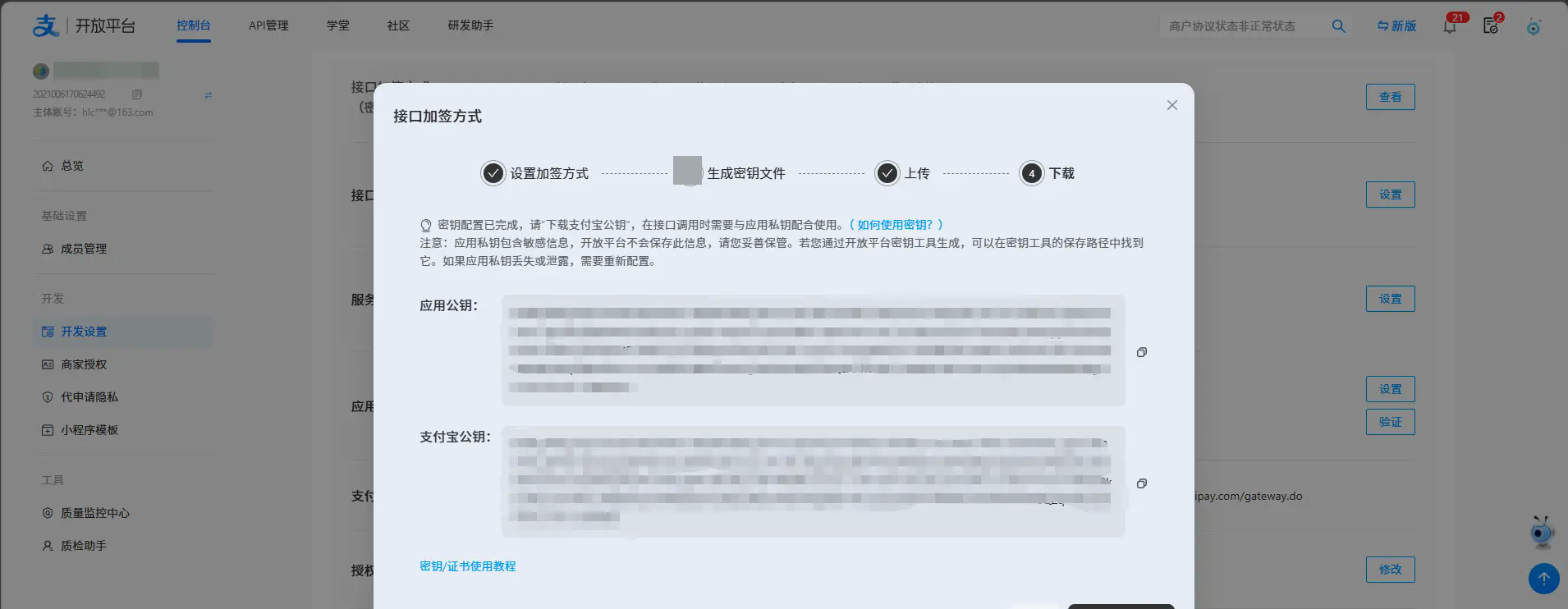
Interface signing requires downloading Alipay's key tool. There are two signing methods. If you want to use some subsequent services such as red envelopes, you need to choose the certificate method. I chose the key method here. According to the software instructions, after generating the key pair, just upload the public key and keep the private key yourself.
What needs to be explained here is that although I chose the key method, the signature method currently recommended by Alipay is the certificate. For this new project, it is recommended to give priority to the certificate method.
Notice
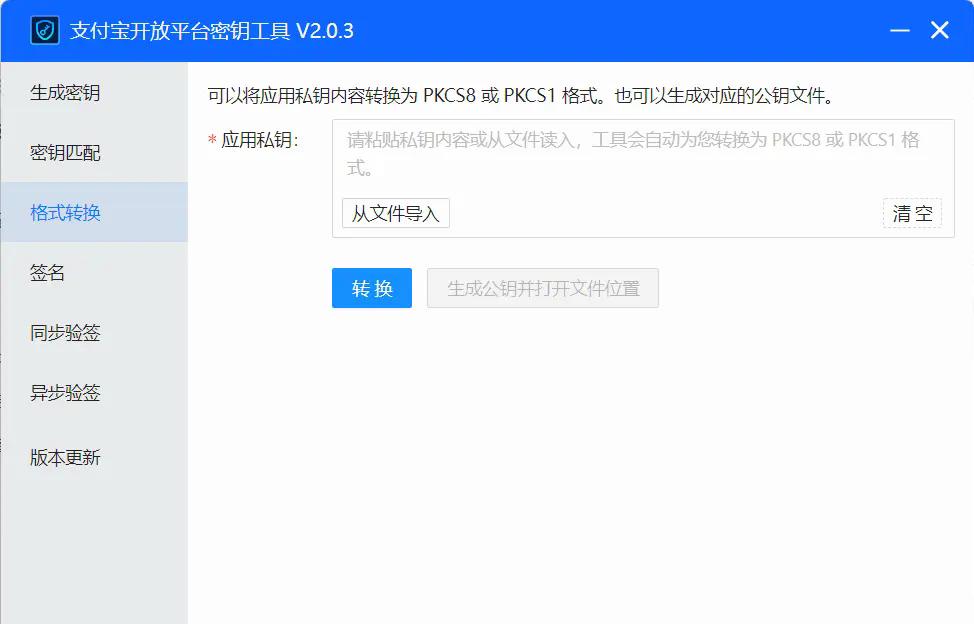
For non-Java development languages, the private key requires an additional layer of conversion to convert the default PCKS8 into PCKS1 format.
Authorization callback address
In service provider mode, an authorization callback address needs to be created. This is the address that the merchant jumps to after completing application authorization. When jumping, key information such as the application authorization code (app_auth_code) and appid will be carried to your callback address. In other words, your callback address must be publicly accessible and cannot be used for authorization verification, and it must be able to accept these parameters. After receiving these parameters, you need to request the Alipay interface to obtain the application authorization token (app_auth_token), and then you need to bring this token with you when requesting Alipay-related interfaces. This is also the only additional development step in the service provider model compared to the merchant self-research model. (Document address:opendocs.alipay.com/common/02qj…)
Other non-required parameter configurations will not be described here. You can configure them as needed. After the operation is completed, you can submit it for review.
Invite merchants to authorize
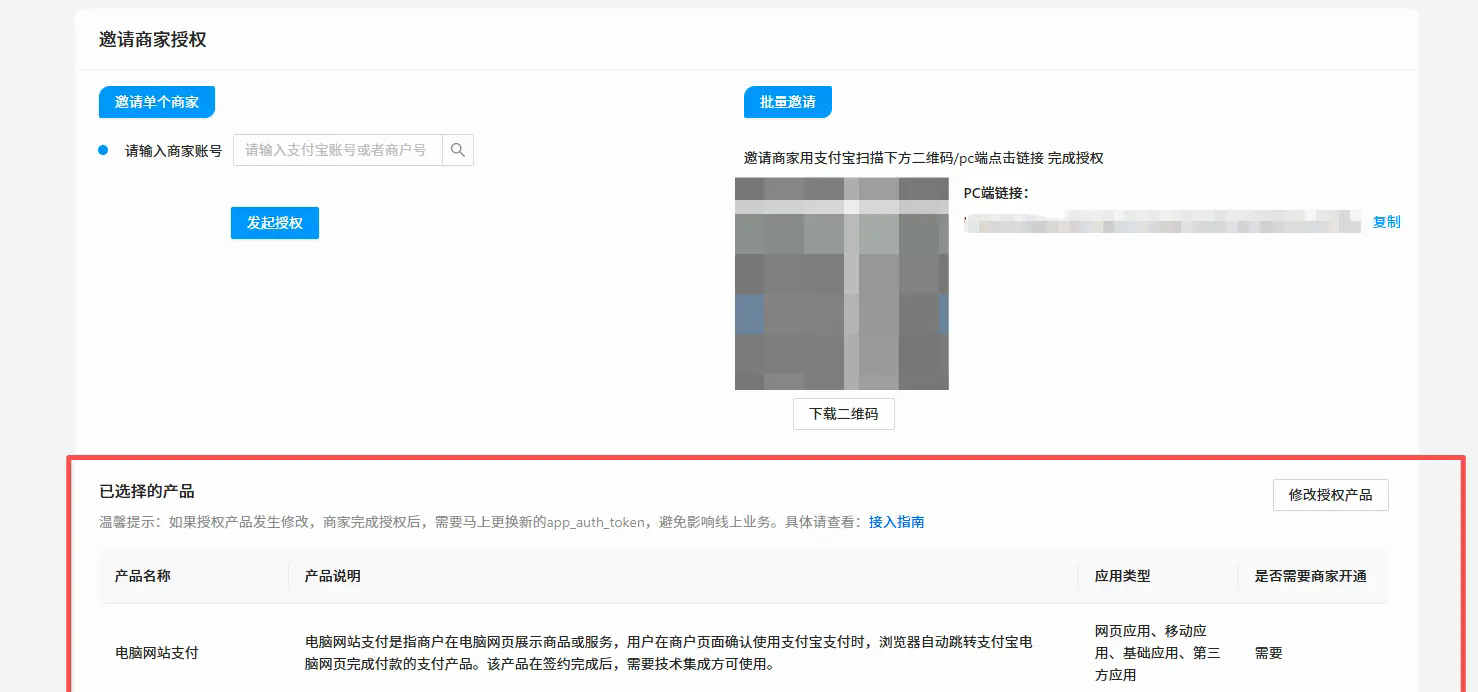
After the application is approved, you can invite merchants for authorization. When inviting, be sure to check the products and services you use, and then you can initiate authorization. After the authorization is completed, it will jump to the authorization callback address we configured earlier to obtain the application token.
Now Alipay has simplified this authorization process, that is, no matter which authorization method is used, even if the jump is not completed in the end, the token after the authorization is completed can be seen on the back end of the open platform. Well, I think Alipay is a compromise with reality. It gives developers a guarantee and further lowers the threshold. But even so, we'd better follow the document guidelines to complete the relevant procedures for authorization callbacks. We can't all point to the platform.
At this point, the service provider's operations are completed. If there are other applications that want to activate Alipay payment in the future, just use the same process to create a third-party application. The key application configurations are managed by the service provider, but using the service requires authorization from the merchant. The advantage of this model is that the management burden on both parties is reduced. If the cooperation is terminated one day, the merchant can terminate the authorization, and the service provider can also take the initiative to terminate it. If necessary, it can be opened without any social pressure~~
Merchant aspect
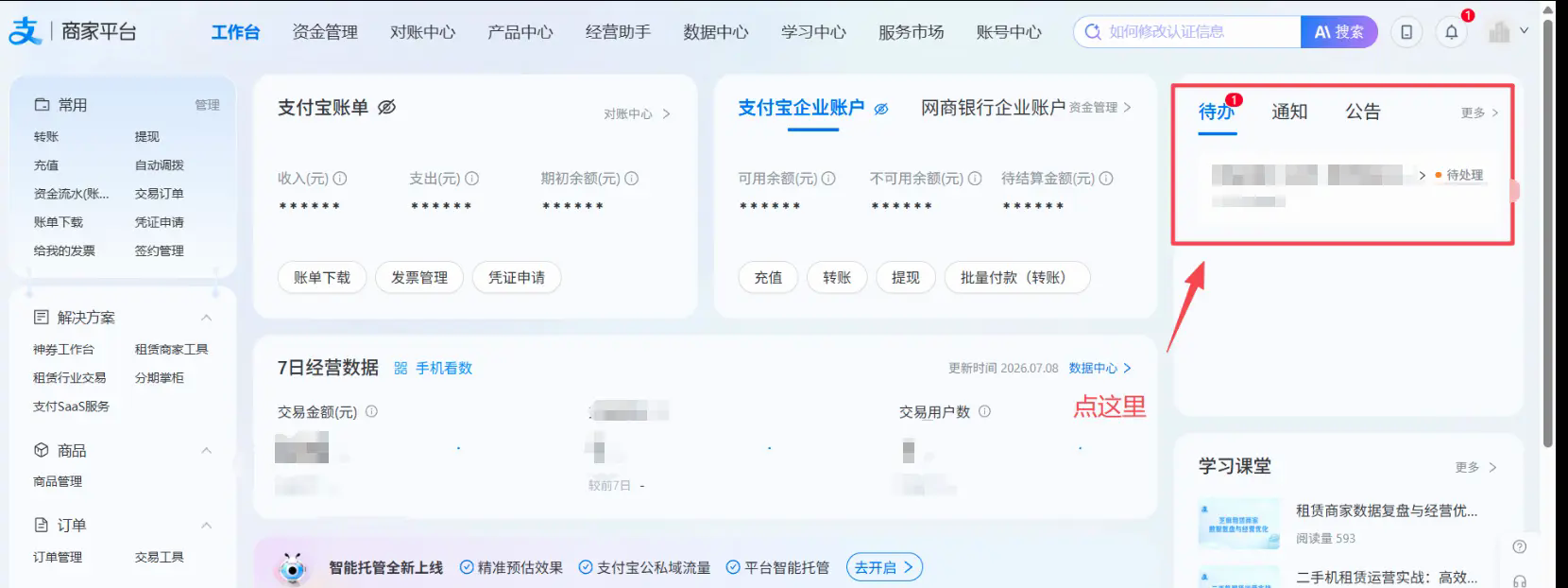
The operation for merchants is much simpler. We have three ways to invite merchants for authorization. If you directly enter the merchant ID to initiate authorization, after the merchant logs in to the merchant platform, you will see a to-do item. Click on it and follow the instructions to complete the operation. You can also use the merchant's Alipay account to scan the QR code, or you can directly click on the authorization link we generated based on the authorization document;
Here I take the first method as an example. After entering the merchant platform, click on the to-do items
Click to agree to authorize
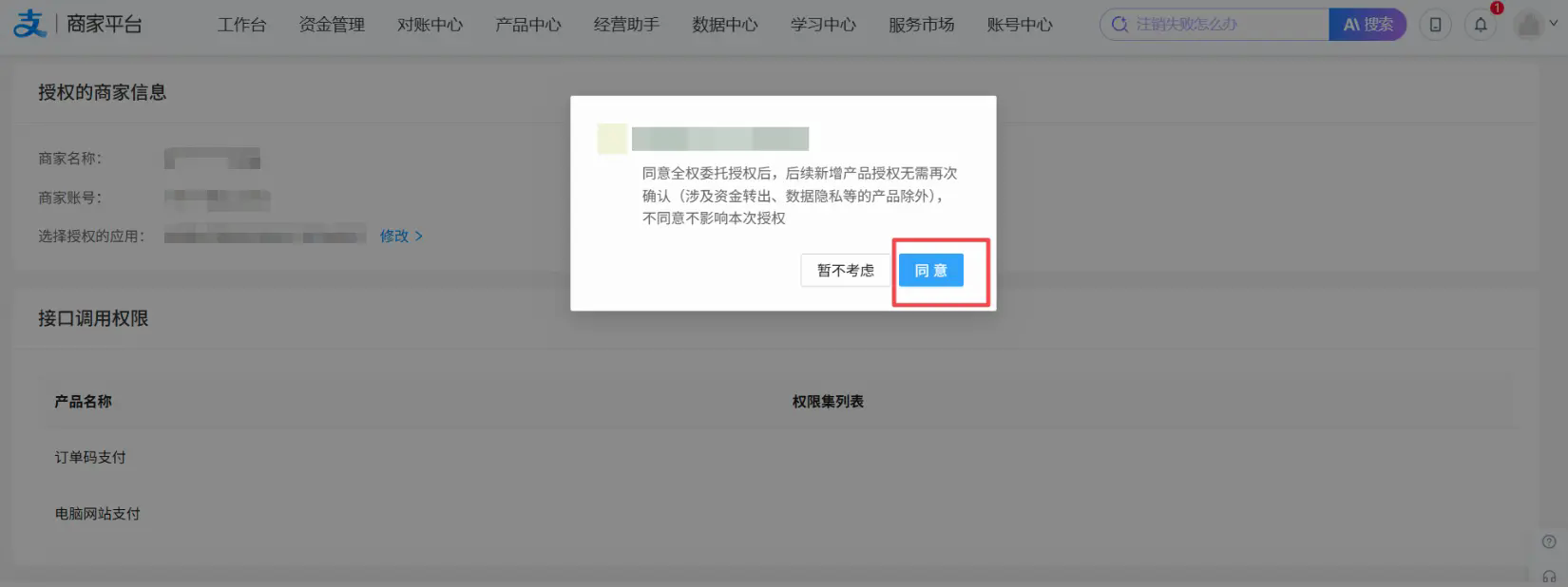
One thing to note here is that if the interface permissions for the authorization check we initiate are not activated on the merchant side, they need to activate them according to the guidelines.
Click to enter this link👉:b.alipay.com/page/produc…, after entering, activate the required products as shown in the figure below; you need to upload relevant materials according to the guidelines and select the business category. Note that the licenses corresponding to each business category must be consistent, otherwise they will be rejected:cshall.alipay.com/enterprise/…
This is an official fixed process. There is nothing to say, as long as you have all the certificates and certificates.
Implementation
Application authorization interface
Earlier we mentioned the application authorization interface to be set up. This needs to be developed locally. The purpose is to automatically obtain the application authorization token after authorization is completed. Again, although the Alipay platform has a policy of keeping things secret, it is better to actually do it. The development documents are here:opendocs.alipay.com/isv/04h3ue?…
In the development document, only the minimum development code for obtaining the token is given, which is irrelevant to the business. So here we need to think about how to better integrate this authorization code into the business system, and make some localized modifications and expansions according to the official guidelines.
The official example of this code is clear enough. Because it is combined with business, it is not very typical. I will briefly talk about the logic here, and then directly give the core code.
- After receiving the parameters after Alipay authorization callback, request the Alipay interface in exchange for app_auto_token
- Update the configuration information in the business system and record the app_auth_token. The most important thing is
- Return a friendly prompt page to the merchant to let him know the results of his operation
The core code is as follows
[HttpGet("Callback")]
[AllowAnonymous]
public async Task<IActionResult> Callback([FromQuery] string app_id, [FromQuery] string app_auth_code)
{
    var query = new AlipayAuthCallbackQuery
    {
        AppId = app_id,
        AppAuthCode = app_auth_code
    };
    if (string.IsNullOrEmpty(query.AppAuthCode))
    {
        return BadRequest("未获取到授权码 app_auth_code");
    }

    var paymentConfigResult = await _decPaymentConfigRepo.GetOneAsync(u => u.AlipayAppId == query.AppId);

    if (paymentConfigResult == null)
    {
        return BadRequest("未获取到支付配置");
    }

    // 拿到app_auth_code后,立即调用支付宝接口换取app_auth_token
    var result = await GetAppAuthTokenAsync(query.AppAuthCode, paymentConfigResult.Id);

    if (!result.IsSuccess)
    {
        // 生成一次性token并缓存失败结果
        var errorToken = Guid.NewGuid().ToString("N");
        var errorResult = new AuthResultCache
        {
            IsSuccess = false,
            ErrorMessage = result.ErrorMessage
        };
        await _easyCachingProvider.SetAsync($"AlipayAuthResult_{errorToken}", JsonHelper.Serialize(errorResult), TimeSpan.FromMinutes(5));

        return Redirect($"/web/alipay-auth-result.html?token={errorToken}");
    }
    // 生成一次性token并缓存成功结果
     var successToken = Guid.NewGuid().ToString("N");
     var successResult = new AuthResultCache
     {
         IsSuccess = true,
         MerchantAppId = result.Value.MerchantAppId,
         AppAuthToken = Encypt(result.Value.AppAuthToken), //注意这里要做一下加密处理,用户最后看到的也是密文,提供给我们的时候,再做解秘的处理
         AuthTime = result.Value.AuthTime.ToString("yyyy-MM-dd HH:mm:ss")
     };
     await _easyCachingProvider.SetAsync($"AlipayAuthResult_{successToken}", JsonHelper.Serialize(successResult), TimeSpan.FromMinutes(5));

    return Redirect($"/web/alipay-auth-result.html?token={successToken}");
}
/// <summary>
/// 验证一次性token并返回授权结果(供前端页面调用)
/// </summary>
[HttpGet("VerifyToken")]
public async Task<IActionResult> VerifyToken([FromQuery] string token)
{
    if (string.IsNullOrEmpty(token))
    {
        return Ok(new { success = false, message = "无效的访问" });
    }

    var cacheKey = $"AlipayAuthResult_{token}";
    var cachedResult = await _easyCachingProvider.GetAsync<string>(cacheKey);

    if (!cachedResult.HasValue || string.IsNullOrEmpty(cachedResult.Value))
    {
        return Ok(new { success = false, message = "链接已过期或无效" });
    }

    // 验证后立即删除,防止重复使用
    await _easyCachingProvider.RemoveAsync(cacheKey);

    var authResult = JsonHelper.Deserialize<AuthResultCache>(cachedResult.Value);
    return Ok(new { success = true, data = authResult });
}
The GetAppAuthTokenAsync method above contains the method of exchanging tokens. The code is the official document for reference. In addition, there are some business codes in it. I will not go into details here. After the final authorization is completed, the user will see a friendly results page. The demonstration effect is as follows.
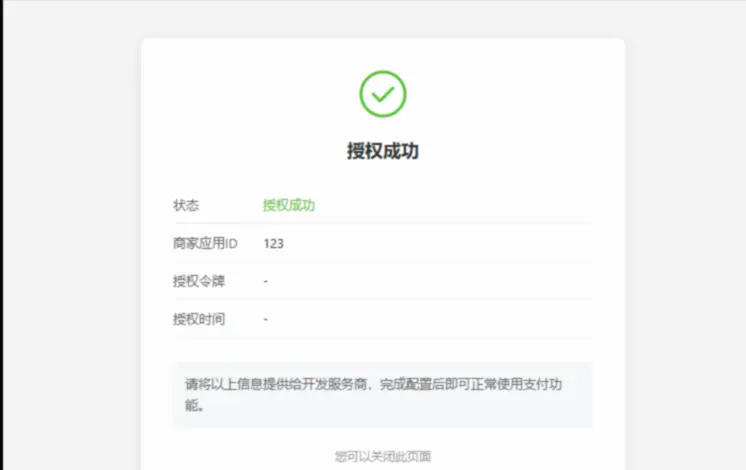
Okay, now, the process of application authorization phase is basically completed.
Order code payment
The development documents related to order code payment are here:opendocs.alipay.com/open/05osux…
This is similar to the Native payment method in WeChat Pay. You can generate payment QR codes on your own system without jumping to a third-party platform. I think it is the best in terms of integration and operating experience. The way I access Alipay here is to use the paylinks plug-in, because the interfaces of Alipay and WeChat are still different. If we use WeChat's service provider model, we cannot directly use the paylinks (v5.0.4 version) plug-in. However, unlike Alipay, we only need to add the authorization token to all request method signatures, and nothing else needs to be changed;
Pre-order interface
Here I give the private method to construct and generate order codes.
private async Task<AlipayTradePreCreateResponse> GetAlipayPreCreateResponse(DecOrderResponseDto order)
{
    var alipayOption = JsonHelper.Deserialize<AlipayClientOptions>(order.DecPaymentConfig!.AlipayCfg);
    AlipayTradePreCreateBodyModel Input = new AlipayTradePreCreateBodyModel()
    {
        OutTradeNo = order.OrderInfo!.OutTradeNo,
        TotalAmount = order.OrderInfo!.TotalAmount.ToString(),
        Subject = order.OrderInfo!.Title,
        NotifyUrl = $"{ConfigurationHelper.GetSection("BaseHost").Value}/api/DecOrderNotify/AlipayResult/{order.DecPaymentConfig.Id}/{order.DecOrderId}"
    };

    var additionalCfg = JsonHelper.Deserialize<PaymentAdditionalDto>(order.DecPaymentConfig.AdditionalCfg);

    var request = new AlipayTradePreCreateRequest();
    request.SetBodyModel(Input);
    if (additionalCfg != null && !string.IsNullOrEmpty(additionalCfg.AlipayAuthToken))
    {
        return await _alipayClient.ExecuteAsync(request, alipayOption, additionalCfg.AlipayAuthToken);
    }
    return await _alipayClient.ExecuteAsync(request, alipayOption);
}
Notification callback
After the payment is completed, you must wait for the callback notification sent by Alipay, and then update the relevant status of the local order. Just like the WeChat payment process, you must ensure that the external status change is greater than the internal one, that is, ensure that the Alipay platform order has been paid before you can update the local order and process related services, such as sending notifications to users. The key code is as follows
 [AllowAnonymous]
 [HttpPost("AlipayResult/{paymentId:long}/{orderId:long}")]
 public async Task<IActionResult> AlipayResult(long paymentId, long orderId)
 {
     // 前置请求签名验证部分省略
     try
     {
         var parameters = await Request.GetAlipayParametersAsync();
         var option = await GetAlipayConfig(paymentId);
         if (option == null)
         {
             _logger.LogError("支付宝支付配置无效");
             await EmailKitHelper.SendEMailToManagerMsgAsync($"支付宝支付配置无效,paymentId:{paymentId};\r\n支付宝返回内容,parameters:{parameters}");
             return AlipayNotifyResult.Fail;
         }
         var notify = await _alipayNotifyClient.ExecuteAsync<AlipayTradeStatusSyncNotify>(parameters, option);
         // 更新订单状态,操作日志等
         var result = await RecordAliPay(notify, parameters, orderId);

         if (result.IsSuccess)
         {
             await _capPublisher.PublishAsync(CapConsts.ApiPrefix + "SendOrderNotice", new NotceOrderModel()
             {
                 orderId = orderId,
                 content = $"您的订单(编号:【{notify.OutTradeNo}】)已支付完成,实收金额为【{notify.ReceiptAmount}元】,关联的申报信息如下:\r\n"
             });
             await _easyCachingProvider.TrySetAsync($"orderNotify_{orderId}",notify.TradeStatus,TimeSpan.FromMinutes(2));
         }
         return AlipayNotifyResult.Success;
     }
     catch (AlipayException ex)
     {
         _logger.LogError(ex.Message);
         return AlipayNotifyResult.Fail;
     }
 }

The first two steps have a previously recorded gif, which relies on Alipay sandbox configuration, which is roughly the same as the formal configuration process. Including generating a pre-order QR code, completing the callback after scanning the code to pay, and refunding the fee, the effect is as follows
What should be noted here is that the sandbox environment can only be used in payment scenarios. The previous authorization scenarios cannot be tested in the sandbox.
Manual reconciliation
Manual reconciliation is to avoid that the previous automatic callback is not completed in time or even fails due to some unpredictable reasons, or the user wants to confirm whether the order is completed soon. Then you can also manually initiate a reconciliation request. Logically, you should first determine the external status and then update the internal one. The private code is as follows.
private async Task<AlipayTradeQueryResponse> GetAlipayTradeQueryResponse(DecOrderResponseDto order)
{
    var alipayOption = JsonHelper.Deserialize<AlipayClientOptions>(order.DecPaymentConfig!.AlipayCfg);

    AlipayTradeQueryBodyModel model = new AlipayTradeQueryBodyModel()
    {
        OutTradeNo = order.OrderInfo!.OutTradeNo
        };

    var additionalCfg = JsonHelper.Deserialize<PaymentAdditionalDto>(order.DecPaymentConfig.AdditionalCfg);

    var request = new AlipayTradeQueryRequest();
    request.SetBodyModel(model);
    return await _alipayClient.ExecuteAsync(request, alipayOption, additionalCfg.AlipayAuthToken);
}
Cancel order
Here I would like to talk about one more situation about order cancellation. In actual scenarios, there will be a situation where a large number of orders are placed without payment. In this case, we cannot completely rely on the user to automatically cancel according to the process. Instead, we need to have a scheduled task to clean up these expired orders in a timely manner. The space limit here no longer gives the code related to the periodic task. Under the dotnet technology stack, there are many options. I am using the Coravel solution;
 private async Task<bool> CloseAlipayOrder(DecOrderSimpleResponseDto order)
 {
     var alipayOption = JsonHelper.Deserialize<AlipayClientOptions>(order.AliPaymentConfig);

     AlipayTradeCloseBodyModel model = new AlipayTradeCloseBodyModel()
     {
         OutTradeNo = order.TradeNo
     };
     var request = new AlipayTradeCloseRequest();
     request.SetBodyModel(model);
     PaymentAdditionalDto paymentAdditionalDto = new PaymentAdditionalDto() { AlipayAuthToken = string.Empty };

     if (!string.IsNullOrWhiteSpace(order.AdditionalCfg))
     {
         paymentAdditionalDto = JsonHelper.Deserialize<PaymentAdditionalDto>(order.AdditionalCfg);
     }
     var response = await _alipayClient.ExecuteAsync(request, alipayOption, paymentAdditionalDto.AlipayAuthToken);
     return response.IsSuccessful;
 }
Refund
private async Task<bool> RefundForAlipay(long configId, ViewDecOrder item)
{
    var allOptions = await GetAlipayConfig(configId);
    // 退款单号规则,R+原单号
    string refundNumber = $"R{item.TradeNo}";
    var Input = new AlipayTradeRefundBodyModel
    {
        RefundAmount = item.Amount.ToString(),
        OutTradeNo = item.TradeNo,
        RefundReason = $"{item.Title}退款",
        OutRequestNo = refundNumber,
    };

    var request = new AlipayTradeRefundRequest();
    request.SetBodyModel(Input);

    var alipayOptions = JsonHelper.Deserialize<AlipayClientOptions>(allOptions.Cfg);
    var additionalCfg = new Application.Dtos.Custom.PaymentAdditionalDto() { AlipayAuthToken = string.Empty };

    if (string.IsNullOrWhiteSpace(allOptions.AdditionalCfg))
    {
        additionalCfg = JsonHelper.Deserialize<Application.Dtos.Custom.PaymentAdditionalDto>(allOptions.AdditionalCfg);
    }
    var response = await _AlipayClient.ExecuteAsync(request, alipayOptions!, additionalCfg.AlipayAuthToken);
    if (response != null && response.FundChange == "Y")
    {
        return await ConfirmAlipayRefundStatus(item.Id, refundNumber, alipayOptions, additionalCfg.AlipayAuthToken);
    }
    return false;
}
Confirm refund status
Confirming the refund status is the same as the logic of confirming the payment status previously. It is also necessary to confirm that the external platform status has been changed first, and the internal business is being modified;
private async Task<bool> ConfirmAlipayRefundStatus(long orderId, string refundNumber, AlipayClientOptions? alipayOptions, string? authToken)
{
    const int maxRetries = 5;
    const int retryIntervalMs = 3000;

    Snackbar.Add("退款已提交,正在等待平台确认...", Severity.Info);

    for (int i = 0; i < maxRetries; i++)
    {
        await Task.Delay(retryIntervalMs);

        var order = await _decOrderProvider.GetOneAsync(u => u.Id == orderId);
        if (order == null) return false;

        // 回调可能已抢先完成
        if (order.OrderStatus == OrderStatus.Closed)
        {
            Snackbar.Add("退款已完成", Severity.Success);
            return true;
        }

        var Input = new AlipayTradeFastPayRefundQueryBodyModel()
        {
            OutRequestNo = refundNumber,
            OutTradeNo = order.TradeNo
        };
        List<String> queryOptions = new List<String>();
        queryOptions.Add("refund_detail_item_list");
        Input.QueryOptions = queryOptions;

        var request = new AlipayTradeFastPayRefundQueryRequest();
        request.SetBodyModel(Input);

        var response = await _AlipayClient.ExecuteAsync(request, alipayOptions!, authToken);
        if (response != null && !string.IsNullOrEmpty(response.RefundStatus) && response.RefundStatus.Equals("REFUND_SUCCESS"))
        {
            var refundResult = await _decOrderProvider.NotifyRefundOrderPassive(orderId, refundNumber);
            if (refundResult.IsSuccess)
            {
                Snackbar.Add("退款操作完成,订单状态已修改", Severity.Success);
            }
            else
            {
                Snackbar.Add(refundResult.ErrorMessage, Severity.Error);
            }
            return true;
        }
    }

    // 重试耗尽但退款API已受理,回调会完成后续逻辑
    Snackbar.Add("退款已提交,平台处理中,请稍后刷新页面查看", Severity.Info);
    return true;
}
Summarize
Okay, that's basically it. There are actually very few things about development. The main thing is to do the previous preparations well. There are no technical difficulties. Finally, give some addresses of cited materials.
- Business categories: cshall.alipay.com/enterprise/…
- Service provider platform:p.alipay.com/page/settle…
- Merchant platform):b.alipay.com/page/home
- Development documentation:opendocs.alipay.com/isv/10467/x…
- Order code payment:opendocs.alipay.com/open/05osux
- Interface content encryption:opendocs.alipay.com/common/02ms…
- Authorization callback:opendocs.alipay.com/isv/04h3ue?…