
In distributed systems, we often need to handle some time-consuming background tasks, such as sending emails, generating reports, image processing, etc. In order not to block the main process, usually useMessage Queue for asynchronous processing.
Today we will introduce a very simple, lightweight and efficient message queue middleware—— Beanstalkd.
1. What is Beanstalkd?
Beanstalkd is aHigh performance, lightweightofDistributed memory queue system, originally developed by an AOL employee for Facebook's Causes application to support asynchronous task processing for massive users. It later became an open source project and was deployed and used on a large scale by companies such as PostRank, processing millions of tasks every day.
The design philosophy of Beanstalkd is very simple - it is a typical work queue (Work Queue), specially designed to solve the asynchronous processing problem of time-consuming tasks. Its design style and protocol are very similar to Memcached. If you have used Memcached, Beanstalkd will feel familiar.
To put it simply, Beanstalkd is like an "express transfer station": the producer (Producer) puts the tasks (Jobs) that need to be processed into different pipelines (Tubes), and the consumer (Consumer) takes out the tasks from the pipelines and executes them. The entire process is asynchronous, which means your main program does not need to wait for the task to complete before it can continue to do other things.
2. Why use message queue?
Before diving into Beanstalkd, let’s first understand what problems message queues can solve.
2.1 Advantages of message queue
Message queue plays an important role in system design and can bring the following benefits:
- Asynchronous processing: Put time-consuming operations (such as sending emails, processing pictures, calling third-party APIs) into the queue, allowing user requests to return quickly, improving page loading speed and user experience
- decoupling: Separate the producers and consumers of tasks. Both parties only need to care about the queue interface and do not need to know the existence of the other party.
- fault tolerance: Even if the consumer service is temporarily unavailable, the task will remain in the queue waiting for recovery and will not be lost.
- Redundancy Guaranteed: Tasks can be processed repeatedly (if failed), ensuring eventual consistency
- Scalability: Multiple consumers can be started to process tasks in parallel to easily cope with traffic peaks.
- peak shaving and valley filling: In sudden traffic scenarios such as flash sales, the queue can buffer requests and protect the back-end system.
2.2 Typical application scenarios of message queue
Any task that takes time or can be executed asynchronously is suitable for putting into the message queue:
- Send email or SMS verification code
- Image/video processing (scaling, transcoding)
- Generate reports or data analysis
- Call third-party APIs (such as payment notifications)
- Order timeout automatically canceled
- Log collection and processing
3. Detailed explanation of Beanstalkd core concepts
Beanstalkd has only four core concepts. Understanding them will help you grasp the essence of Beanstalkd.
3.1 Job——Task
Job It is the most basic unit of work in Beanstalkd, similar to the "message" in other message queues. Each Job contains the following elements:
- ID: Globally unique numeric identifier, automatically assigned by Beanstalkd
- Body: The actual data to be processed can be any byte stream (such as JSON string, text, serialized object)
- Priority: Integer from 0~2^32,The smaller the value, the higher the priority., defaults to 1024 (0 is the highest priority).
- state:Job will be in different states during the life cycle
3.2 Tube——Pipeline
Tube It is a task queue container, similar to the "topic" (Topic or Channel) in the message queue. Each Tube stores tasks of the same type, and different Tubes are isolated from each other and do not affect each other.
In practical applications, we can create different Tubes for different types of tasks:
email-tube: Store email sending tasksimage-tube:Storage image processing tasksorder-tube: Store order timeout check task
After Beanstalkd is started, it will automatically create a file named default Tube. If the producer does not specify a Tube, the task will be put into default; If the consumer does not follow other Tubes, it will only consume by default default tasks in .
- Producer passes
use <tube-name>The command specifies the Tube into which the Job is placed. - Consumers pass
watch <tube-name>The command follows one or more Tubes and obtains tasks from them; it can also be passedignoreUnfollow.
3.3 Producer——Producer
Producer is a program that generates tasks through put The command places a Job into the specified Tube.
The producer only needs to care about three parameters:
- priority: The urgency of the task being consumed
- Delay: After the task is put into the queue, how many seconds to wait before it becomes ready (applicable to scheduled tasks)
- TTR(Time To Run): The maximum time allowed for the consumer to process the task (seconds). Tasks that are not processed after timeout will automatically return to the ready queue.
3.4 Consumer——Consumer
Consumer is a program that handles tasks through reserve The command gets the Job from the Tube, and after the processing is completed, different operations are performed based on the results:
- delete: The task is successfully processed and completely deleted.
- release: Task processing fails and is put back into the queue (delayed retry can be set)
- bury: When encountering an unknown exception, "bury" the task first and wait for manual intervention to investigate.
- kick: Put buried tasks back into the ready queue
4. Detailed explanation of Job life cycle
The most unique thing about Beanstalkd is that it defines a clear job state flow. A Job can be in the following four states during its life cycle:
4.1 Status definition
| state | describe |
|---|---|
| READY | Ready state, the task is waiting for the consumer to take it away |
| RESERVED | Reserved status, the task has been taken away by the consumer and is being processed |
| DELAYED | In the delayed state, the task waits for the delay time to expire and enters READY after expiration. |
| BURIED | Tasks are "buried", usually temporarily suspended after processing failure, waiting for manual intervention |
| DELETED | The task is deleted and the life cycle ends |
4.2 Status flow diagram
┌───────────┐      put with delay       ┌────────────┐
│ Producer  │ ─────────────────────────▶ │  DELAYED   │
└───────────┘        (Delay tasks)           │ (delay queue) │
                                          └────────────┘
                                                │
                                                │ time is up
                                                ▼
┌───────────┐      put (delay=0)         ┌────────────┐
│ Producer  │ ─────────────────────────▶ │   READY    │
└───────────┘        (Immediate tasks)           │ (ready queue) │
                                          └────────────┘
                                                │
                                                │ reserve
                                                ▼
                                          ┌────────────┐
                                          │  RESERVED  │
                                          │ (Processing) │
                                          └────────────┘
                                                │
                    ┌───────────────────────────┼───────────────────────────┐
                    │                           │                           │
                    │ delete                    │ release                   │ bury
                    │ (Processed successfully)                  │ (Processing failed)                │ (Unknown exception)
                    ▼                           │                           │
              ┌───────────┐                     ▼                           ▼
              │ *deleted* │          ┌─────────────────────┐        ┌────────────┐
              │ Mission ended  │          │ release with delay  │        │   BURIED   │
              └───────────┘          │    (Retry with delay)    │        │ (buried queue) │
                                      └─────────────────────┘        └────────────┘
                                            │                               │
                                            │ if delay>0                  │ kick
                                            ▼                               │ (After the administrator repaired)
                                      ┌────────────┐                        │
                                      │  DELAYED   │ ◄──────────────────────┘
                                      │ (delay queue) │
                                      └────────────┘
                                            │
                                            │ time is up
                                            ▼
                                      ┌────────────┐
                                      │   READY    │
                                      │ (ready queue) │
                                      └────────────┘
4.3 Status transfer description
-
Producer puts task :
- if
putspecified whendelay > 0, the task enters first DELAYED state - if
delay = 0, the task enters directly READY state
- if
-
Consumers take tasks :
- consumer call
reserveRemove a task from the READY queue - The task status changes to RESERVED, monopolized by this consumer
- consumer call
-
Consumer processing results :
- success: call
delete, the task is completely destroyed - Failed and want to try again: call
release, the task returns to READY (delay can be set) - Exceptions require manual intervention: call
bury, the task enters BURIED state
- success: call
-
Timeout protection :
- If the consumer does not process the task within the TTR (Time To Run) time (that is, does not call delete/release/bury), Beanstalkd will automatically put the task back into the READY queue to prevent the task from getting stuck.
-
Buried task processing :
- After the administrator troubleshoots the problem, he can use
kickThe command puts the BURIED task back into the READY queue and allows the consumer to try again
- After the administrator troubleshoots the problem, he can use
5. Features and advantages of Beanstalkd
5.1 Main features
5.1.1 Priority support
Beanstalkd supports priorities from 0 to 2^32,The smaller the value, the higher the priority. . High-priority tasks will be taken away first by consumers, which is very useful for tasks that require urgent processing.
5.1.2 Delayed tasks
You can specify a delay time when placing a task, so that the task becomes ready after the specified time. This is very suitable for implementing scheduled tasks, such as automatically canceling an order after 30 minutes of timeout.
5.1.3 Persistence
Beanstalkd supports via binlog Log tasks and their status to a file. If added at startup -b parameters, the server will enable persistence, and after restarting, the binlog can be read to restore the previous tasks and status.
5.1.4 Timeout control (TTR)
In order to prevent the consumer from hanging up and causing the task to be stuck in the RESERVED state forever, Beanstalkd sets a TTR (Time To Run) for each task. If the consumer does not complete the task within TTR and delete/release/bury, the task will automatically return to the READY queue.
5.1.5 Distributed fault tolerance
The distributed design of Beanstalkd is similar to Memcached. Each server does not know the existence of each other and is completely distributed through the client. The client can select a specific server to obtain the task based on the tube name.
5.2 Core advantages
- Lightweight and high performance: Beanstalkd is written in C language and is event-driven based on libevent. It has extremely fast processing speed and a single instance can handle thousands of tasks per second.
- fast: Based on memory operations, the reading and writing speed is very fast.
- lightweight: No dependencies, a single binary file can be run.
- Simple and easy to use: The protocol and usage are similar to Memcached, with low learning cost and easy to understand and implement the client.
- Unique state machine design:BURIED state provides great flexibility in error handling
- No dependencies: Beanstalkd itself has no external dependencies, and deployment is very simple
6. Disadvantages of Beanstalkd
Although Beanstalkd performs well in many scenarios, it also has some limitations:
6.1 Lack of high availability and replication
Beanstalkd does not natively support data replication or multi-machine clustering. If the server goes down, even if persistence is turned on, manual recovery is required and automatic failover is not possible.
6.2 No built-in sharding
Beanstalkd does not support native sharding (Sharding). When the performance of a single machine reaches a bottleneck, you need to implement the sharding logic on the client.
6.3 No security authentication mechanism
The Beanstalkd protocol itself does not provide any authentication or encryption mechanisms. Clients connected to the port can produce and consume tasks at will. Therefore, officials strongly recommend restricting port access through firewalls and only allowing trusted clients to connect.
6.4 The function is relatively simple
Compared with mature message middleware such as RabbitMQ and Kafka, Beanstalkd has more basic functions and does not support publish/subscribe mode (Pub/Sub) or advanced routing rules.
6.5 Cannot delete Tube
Beanstalkd does not provide a command to directly delete a tube. You can only delete the tasks in the Tube one by one and let Beanstalkd automatically clean up the empty Tube.
7. Comparison with other message queues
In order to allow readers to better understand the positioning of Beanstalkd, the following is compared with several common message queues.
| Contrast Dimensions | Beanstalkd | RabbitMQ | Apache Kafka | Redis queue |
|---|---|---|---|---|
| position | Lightweight work queue | Full-featured message broker | Distributed streaming platform | Queue function of memory data structure |
| Deployment method | Self-hosted | Self-hosted | Self-hosted | Self-hosted |
| persistence | Optional (binlog) | Support (disk) | Force (disk) | Optional (RDB/AOF) |
| priority | support | support | Not supported | Can be simulated via List |
| delayed message | support | Support (plug-in) | Not supported | Need to be implemented with ZSet |
| message sequence | FIFO (affected by priority) | FIFO | Ordered within partitions | FIFO |
| protocol | Custom ASCII TCP | AMQP | Custom TCP | RESP |
| Certified safe | none | Complete | Complete | simple password |
| High availability | Requires client implementation | mirror queue | copy mechanism | Sentinel/Cluster |
| performance | Very high (memory operations) | higher | Extremely high (volume) | extremely high |
| community ecology | smaller | huge | huge | huge |
8. Installation and deployment
8.1 Install via Docker (recommended)
Using Docker is the easiest and fastest way.
# start up beanstalkd container, the default port is 11300
# If persistence is not enabled, the data will be lost after restarting. It is suitable for development environment.
docker run -d --name alex-dq \
-p 11300:11300 \
schickling/beanstalkd


 # If you need to enable persistence
docker run -d --name alex-dq \
-p 11300:11300 \
-v $PWD/data:/data \
schickling/beanstalkd \
-b /data -f 100
Persistence:
-b /data: Tell beanstalkd to enable the binlog mechanism and write the data file (binlog) into the container./dataTable of contents. If this parameter is not added, beanstalkd will run in memory by default, and data will be lost after restarting.-v $PWD/data:/data: Change the directory in the current directory of the host (your computer)dataMount the folder into the container/dataTable of contents.
As long as these two parameters exist at the same time, the data files generated in the container will be synchronized and saved to your host machine in real time. $PWD/data directory. Even if you delete the container (docker rm), as long as you don’t delete the host’s data Directory, the next time you restart the container and mount the same directory, the data will still exist.
Although it is turned on -b, but by default beanstalkd does not flush the disk immediately (fsync) every time a piece of data is written, but has a certain strategy (the default is based on system scheduling). If you want higher data security (sacrifice a little performance), you can add -f parameter:
Data security:
-f MS: Forcibly flush the disk every MS milliseconds.
For example, to flush the disk every 100 milliseconds:
docker run -d --name alex-dq \
-p 11300:11300 \
-v $PWD/data:/data \
schickling/beanstalkd \
-b /data -f 100
Can enter directly alex-dq container execution beanstalkd Order
# Enter the container
docker exec -it alex-dq bash

# Check beanstalkd Command line parameter help
beanstalkd -h

# The following content will be output
Use: beanstalkd [OPTIONS]

Options:
 -b DIR   wal directory --> wal The directory where the file is located (default is /data, Need to specify when turning on persistence)
 -f MS    fsync at most once every MS milliseconds (use -f0 for "always fsync") --> every MS Force flushing once in milliseconds (default is 0, That is not mandatory)
 -F       never fsync (default) --> Do not force disk flash (enabled by default))
 -l ADDR  listen on address (default is 0.0.0.0) --> Monitoring IP address (default is 0.0.0.0, That is, listen to all addresses)
 -p PORT  listen on port (default is 11300) --> The port number to listen on (default is 11300)
 -u USER  become user and group --> Switch to the specified user and user group
 -z BYTES set the maximum job size in bytes (default is 65535) --> Maximum task size (default is 65535 byte)
 -s BYTES set the size of each wal file (default is 10485760) --> each wal The size of the file (default is 10485760 byte)
            (will be rounded up to a multiple of 512 bytes) --> will be rounded to the nearest 512 multiple of bytes
 -c       compact the binlog (default) --> turn on binlog Compression (on by default))
 -n       do not compact the binlog --> Not open binlog compression
 -v       show version information --> Show version information
 -V       increase verbosity --> Add log verbosity(The default is 0)
 -h       show this help --> Show help information
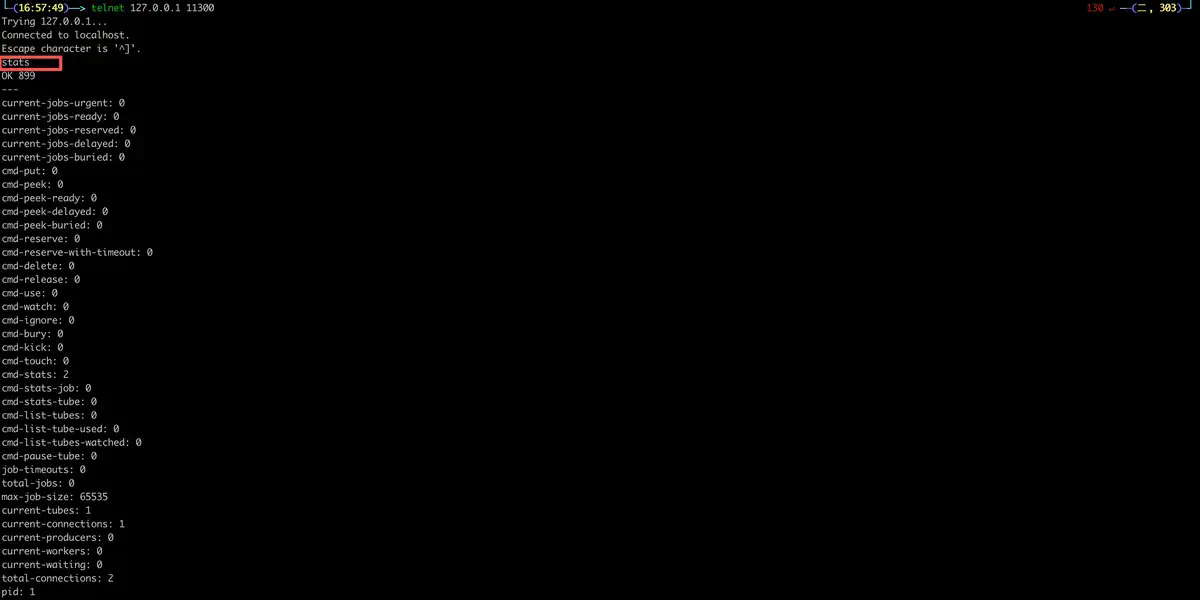
Verify whether the service starts successfully:
telnet 127.0.0.1 11300

# enter stats command, indicating success if a large number of statistics are returned
stats

# If not used telnet You can also view it directly through docker Container logs to check if the installation was successful
docker logs alex-dq
8.2 Direct installation on Linux system
On CentOS/RHEL systems, it can be installed from EPEL sources:
# Install EPEL source (if not installed)
yum install epel-release

# Install beanstalkd
yum install beanstalkd

# Start service
systemctl start beanstalkd

# Set up auto-start at power on
systemctl enable beanstalkd

# Configuration file location (optional)
/etc/sysconfig/beanstalkd
Parameters can be specified when starting manually:
/usr/bin/beanstalkd -l 0.0.0.0 -p 11300 -b /var/lib/beanstalkd/binlog -F
Parameter description:
-l:Monitoring IP address-p: Listening port (default 11300)-b:binlog persistence directory-F:Run in the foreground (non-daemon mode)
9. Go language practice
Next, we'll write a complete producer and consumer example in Go.
Related sample codes can be found at:github.com/pudongping/…
9.1 Install the Go client
First, install the Go client library:
go get github.com/beanstalkd/go-beanstalk
9.2 Basic usage
9.2.1 Producer - put tasks
Create a producer.go document:
package main

import (
	"fmt"
	"log"
	"time"

	"github.com/beanstalkd/go-beanstalk"
)

func main() {
	// 1. Connect to Beanstalkd server
	// Dial Function accepts network type("tcp")and address("127.0.0.1:11300")
	conn, err := beanstalk.Dial("tcp", "127.0.0.1:11300")
	if err != nil {
		// Print error and exit when connection fails
		log.Fatalf("connect Beanstalkd fail: %v", err)
	}
	// Ensure that the connection is closed and resources are released when the function exits
	defer conn.Close()

	// 2. create Tube Object specifying the queue name we want to use
	// Tube Represents a task queue pipeline, here we use "email-tube"
	tube := &beanstalk.Tube{Conn: conn, Name: "email-tube"}

	// 3. Prepare task data
	// In practical applications, this is usually JSON Format string containing the information required by the task
	// For example: userID, Email type, recipient address, etc.
	jobBody := []byte(`{
		"user_id": 12345,
		"email": "user@example.com",
		"subject": "Welcome to register",
		"template": "welcome_email"
	}`)

	// 4. Put task into queue
	// Put Parameter description:
	// - body: Task data (byte slice)
	// - priority: priority, 0 The highest, the larger the value, the lower the priority, used here 1 Indicates higher priority
	// - delay: Delay time, 0 Indicates entering the ready queue immediately
	// - ttr: Time To Run, The maximum time for the consumer to process the task. If the task is not processed beyond this time, the task will be put back into the ready queue.
	//   This is set to 2 minutes, assuming that sending an email requires at most 2 minute
	id, err := tube.Put(jobBody, 1, 0, 120*time.Second)
	if err != nil {
		log.Fatalf("Failed to put task: %v", err)
	}

	// 5. Output tasks ID, Facilitate follow-up
	fmt.Printf("✅ Successfully placed the task, Job ID: %d\n", id)
	fmt.Printf("📦 Task content: %s\n", string(jobBody))
}
9.2.2 Consumer - processing tasks
Create a consumer.go document:
package main

import (
	"fmt"
	"log"
	"time"

	"github.com/beanstalkd/go-beanstalk"
)

func main() {
	// 1. Connect to Beanstalkd server
	conn, err := beanstalk.Dial("tcp", "127.0.0.1:11300")
	if err != nil {
		log.Fatalf("connect Beanstalkd fail: %v", err)
	}
	defer conn.Close()

	// 2. Set what consumers pay attention to Tube
	// TubeSet You can follow multiple at the same time Tube, Here we only focus on "email-tube"
	tubeSet := beanstalk.NewTubeSet(conn, "email-tube")

	// You can also follow one individually Tube(Both methods are equivalent)
	// conn.Watch("email-tube")
	// If you don't want the default "default" tube, can ignore it
	// conn.Ignore("default")

	fmt.Println("👂 Consumer starts, waiting for tasks...")
	fmt.Println("according to Ctrl+C quit")

	// 3. Infinite loop, continuous processing of tasks
	for {
		// 4. reserved(Reserve)a task
		// Reserve It is a blocking operation and will wait until a task arrives or times out.
		// The parameter is the timeout, which is set here to 5 minute
		// if in 5 If there is no task within minutes, it will return beanstalk.ErrTimeout mistake
		id, body, err := tubeSet.Reserve(5 * time.Minute)

		if err != nil {
			// Handle timeouts or other errors
			if err == beanstalk.ErrTimeout {
				fmt.Println("⏱️ Wait for timeout and continue monitoring...")
				continue
			}
			// Other errors (such as disconnection) will exit the program.
			log.Fatalf("Reserve fail: %v", err)
		}

		// 5. Successfully got the task and started processing it
		fmt.Printf("\n📨 received task ID: %d\n", id)
		fmt.Printf("📄 Task content: %s\n", string(body))

		// 6. Simulate business processing
		// It is assumed here that the operation is to send an email
		err = sendEmail(string(body))

		if err == nil {
			// 6.1 Processed successfully: delete task
			// Delete Tell Beanstalkd The task is completed and can be removed from the queue
			err = conn.Delete(id)
			if err != nil {
				log.Printf("❌ Delete task %d fail: %v", id, err)
			} else {
				fmt.Printf("✅ Task %d Processed successfully and deleted\n", id)
			}
		} else {
			// 6.2 Processing failed: optional release or bury
			// Here you decide how to handle it based on the error type
			if isRecoverableError(err) {
				// Recoverable errors (such as network timeout), release Re-enqueue the task and try again
				// Release Parameters: priority, delay time
				// Delay here 10 Try again in seconds
				err = conn.Release(id, 1, 10*time.Second)
				fmt.Printf("🔄 Task %d temporary failure, 10Try again in seconds: %v\n", id, err)
			} else {
				// Unrecoverable errors (such as email format errors) will bury the task and wait for manual troubleshooting.
				err = conn.Bury(id, 1)
				fmt.Printf("🪦 Task %d An unknown error was encountered and has been buried.: %v\n", id, err)
			}
		}

		fmt.Println("--- Waiting for the next task ---")
	}
}

// Simulate the function of sending emails
func sendEmail(body string) error {
	// This is just a simulation, the actual code will call the mail service API
	fmt.Println("📧 Sending mail...")

	// Simulation fails randomly (for demonstration)
	// In actual code, this should be the real business logic
	// For example, parsing JSON, Call the mail gateway, etc.

	// For demonstration purposes, we assume that it always succeeds
	// If you want to test failure, you can uncomment the following
	// if time.Now().Unix()%2 == 0 {
	//     return fmt.Errorf("Mail service timeout")
	// }

	return nil
}

// Determine whether the error is recoverable
func isRecoverableError(err error) bool {
	// Here you can judge based on the error type
	// For example: network timeout and service temporary unavailability are recoverable
	// Data format errors and user non-existence are irrecoverable.
	return true // Simplify processing by assuming all errors are recoverable
}
9.3 Advanced usage examples
9.3.1 Delayed tasks
package main

import (
	"fmt"
	"log"
	"time"

	"github.com/beanstalkd/go-beanstalk"
)

func main() {
	conn, err := beanstalk.Dial("tcp", "127.0.0.1:11300")
	if err != nil {
		log.Fatal(err)
	}
	defer conn.Close()

	tube := &beanstalk.Tube{Conn: conn, Name: "order-tube"}

	// Order timeout task: 30Automatically cancel the order after minutes
	jobBody := []byte(`{"order_id": "ORD123456", "action": "cancel_if_unpaid"}`)

	// Delay 30 minute(1800 seconds) to execute
	id, err := tube.Put(jobBody, 1, 1800*time.Second, 60*time.Second)
	if err != nil {
		log.Fatal(err)
	}

	fmt.Printf("Order timeout task has been created, ID: %d, will be in30Execute in minutes\n", id)
}
9.3.2 Buried task processing (administrator script)
Create a kick_buried.go File, used to handle buried tasks:
package main

import (
	"fmt"
	"log"
	"time"

	"github.com/beanstalkd/go-beanstalk"
)

func main() {
	conn, err := beanstalk.Dial("tcp", "127.0.0.1:11300")
	if err != nil {
		log.Fatal(err)
	}
	defer conn.Close()

	// use tube Object operation specified queue
	tube := &beanstalk.Tube{Conn: conn, Name: "email-tube"}

	// Check buried The number of tasks in the status
	stats, err := tube.Stats()
	if err != nil {
		log.Fatal(err)
	}

	buriedCount := stats["current-jobs-buried"]
	fmt.Printf("current buried Number of tasks: %s\n", buriedCount)

	if buriedCount == "0" {
		fmt.Println("No buried tasks to deal with")
		return
	}

	// Ask users what to do
	fmt.Printf("Discover %s Buried tasks, whether to kick them all back to the ready queue?(y/n): ", buriedCount)
	var answer string
	fmt.Scanln(&answer)

	if answer == "y" || answer == "Y" {
		// Kick The command will buried Task kicked back ready queue
		// The parameter indicates the maximum number of tasks that can be kicked back
		kicked, err := tube.Kick(100) // Most kick back 100 indivual
		if err != nil {
			log.Fatal(err)
		}
		fmt.Printf("Kicked back %d tasks to ready queue\n", kicked)
	}
}
9.4 Multiple Tube Consumer Example
In practical applications, a consumer may need to handle multiple different types of tasks:
package main

import (
	"fmt"
	"log"
	"time"

	"github.com/beanstalkd/go-beanstalk"
)

func main() {
	conn, err := beanstalk.Dial("tcp", "127.0.0.1:11300")
	if err != nil {
		log.Fatal(err)
	}
	defer conn.Close()

	// Follow multiple Tube: Mail queue, image processing queue, order queue
	tubeSet := beanstalk.NewTubeSet(conn, "email-tube", "image-tube", "order-tube")

	fmt.Println("Multitasking consumer starts, waiting for tasks...")

	for {
		id, body, err := tubeSet.Reserve(10 * time.Minute)
		if err != nil {
			if err == beanstalk.ErrTimeout {
				continue
			}
			log.Fatal(err)
		}

		// Determine the type according to the task content and distribute processing
		// For the sake of simplicity here, we assume that we can body Parse out the task type
		// In practical application, the task body should contain type identifier
		fmt.Printf("received task ID: %d, content: %s\n", id, string(body))

		// Delete after processing is complete
		conn.Delete(id)
	}
}
10. Quick check of commonly used telnet commands
For debugging and monitoring, it is very convenient to operate Beanstalkd directly via telnet. Here are some commonly used commands:
# connect beanstalkd server
telnet 127.0.0.1 11300

# View all tube list
list-tubes

# switch to specified tube, If we want to put a task in, we need to specify the tube
# use test_tube
use test_tube

# Put a task
# The command format is as follows:
# put <priority> <Delay seconds> <TTR seconds> <Number of data bytes>\r\n<data>\r\n
put 5 0 60 11
hello world
# explain:
# 5 is the priority, 0 Indicates the highest priority
# 0 is the delay seconds, 0 means to put it in immediately ready queue
# 60 yes TTR Number of seconds. If the task processing time exceeds this value, it will be beanstalkd Consider it a failure and try again. ready Queue, that is to say, consumers need to be in TTR Process and delete the task within seconds, otherwise it will be considered a failure
# Data body length 11 Bytes, that is hello world(Note that there is automatically at the end \r\n, But only the actual content is counted when calculating length.)

# Put a second task (with delay)
put 2 5 60 5
later

# View task statistics (optional)
stats-job 1

# focus on test_tube Queue, ignore default queue
watch test_tube
ignore default

# Reserve and work on the first task
reserve
# Assuming the processing is successful, delete it, where the 1 It's a task ID, Need to be replaced according to actual situation
delete 1

# Try to reserve the second task (still delayed, will it be blocked? No, reserve Will only take ready of)
# Can peek View delay queue
peek-delayed
# Tasks will be displayed 2

# direct kick will not affect delayed, You need to wait for the time to arrive, or use kick-job kick forcefully
# But after we wait a few seconds, it will automatically ready, Here is a demonstration of kicking one directly buried Mission
# Bury one first
put 3 0 60 4
bury
# Reserve and bury
reserve
# implement bury The command will bury the currently reserved tasks and the status will change to buried, Waiting for administrator to process
# of which 3 represents a task ID, 1 Indicates the priority, the default is 1024, The smaller the value, the higher the priority.
bury 3 1
# implement kick The command will buried The status of the task is put back ready Queue, waiting for consumer processing
# of which 1 Indicates the most kicked back 1 tasks, the highest priority task will actually be kicked back based on priority.
kick 1

# Clean up final tasks
reserve
delete 3

# quit telnet
# Press first Ctrl+], Enter again quit
quit
10.1 Connection and basic commands
telnet 127.0.0.1 11300
| Order | illustrate | Example |
|---|---|---|
list-tubes | List all tubes | list-tubes |
stats | View server statistics | stats |
stats-tube <tube> | View statistics for a specified tube | stats-tube email-tube |
use <tube> | tube used by the producer | use email-tube |
watch <tube> | tubes that consumers pay attention to | watch email-tube |
ignore <tube> | Ignore a tube | ignore default |
10.2 Task operation commands
| Order | illustrate | Example |
|---|---|---|
put <pri> <delay> <ttr> <bytes> | put task | put 1 0 60 11hello world |
reserve | Get a task | reserve |
reserve-with-timeout <seconds> | Get with timeout | reserve-with-timeout 5 |
delete <id> | Delete task | delete 123 |
release <id> <pri> <delay> | release task | release 123 1 0 |
bury <id> <pri> | buried mission | bury 123 1 |
kick <bound> | Kick back buried mission | kick 10 |
peek-ready | Peep a ready task | peek-ready |
peek-buried | Peep into a buried mission | peek-buried |
peek-delayed | Peep into a deferred task | peek-delayed |
stats-job <id> | View task statistics | stats-job 123 |
11. Monitoring and Management
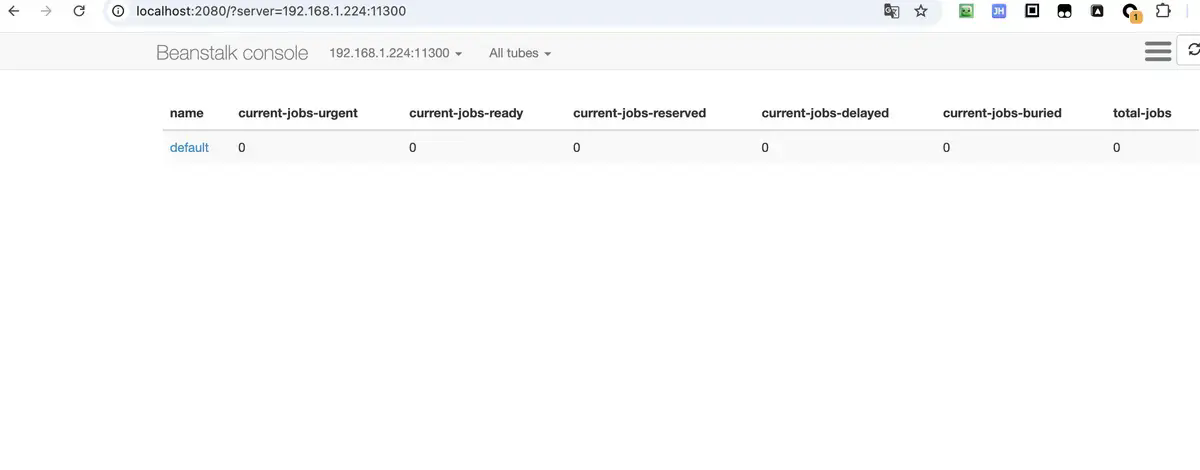
11.1 Web management interface
Beanstalkd itself does not provide a web interface, but the community has some open source tools:
beanstalk_console: Web management tool written in PHP
git clone https://github.com/ptrofimov/beanstalk_console
Install beanstalk console web management tool
# in BEANSTALK_SERVERS for beanstalkd address and port
docker run -d \
--name alex-dq-console \
-p 2080:2080 \
-e BEANSTALK_SERVERS=192.168.1.224:11300 \
schickling/beanstalkd-console
Can be accessed directly through the browser http://localhost:2080/ to view beanstalkd status and queue information.
12. Summary
Beanstalkd is a "small but beautiful" message queue. It doesn’t have the throughput of Kafka, nor the complex routing of RabbitMQ, but it doesDelayed tasks, PrioritizationandLightweight background tasksIn these scenarios, there are irreplaceable advantages. It's perfectly adequate and useful for most small to medium-sized projects.