
🚀 Node.js path and fs modules, the evolution from callback hell to async/await!
summary: Every Node.js developer cannot avoid it
pathandfsThese two built-in modules. This article starts from the actual code and takes you to thoroughly understand the pitfalls of path operations, as well as the complete evolutionary history of file reading and writing from callback hell to async/await.
📌 Foreword
When I first learned Node.js, I thought file operations were just a matter of "reading and writing". Until I encountered:
path.joinandpath.resolveWhat's the difference?- Why does my path spell out an extra number?
/? - Reading three files, the code is indented three levels. Is this written by a human?
If you have ever had similar confusion, this article is for you. I will useTons of runnable code examples, explain these knowledge points thoroughly at once.
🎯 Who is this article suitable for?
- 🌱 Node.js beginner, want to understand the usage of built-in modules
- 🔧 Front-end developer switched to back-end, not familiar with file system operations
- 💡 Developers who want to understand the evolution of asynchronous programming
- 📝 Students who are preparing for interviews and need to sort out the basics of Node.js
📚 1. Path module — the Swiss Army Knife of path operations
path It is a built-in path processing module of Node.js. It does not need to be installed and can be introduced directly:
import path from 'path';
1.1 path.join vs path.resolve — the two most confusing methods
Both methods can splice paths, but behave completely differently.High-frequency test center for interviews!
path.join — pure splicing, does not care whether the path is legal or not
// Simple splicing
console.log(path.join('a', 'b', 'c'));
// output: a\b\c(Windows)or a/b/c(Mac/Linux)

// Splice relative paths
console.log(path.join('hello', 'world', './a', 'b'));
// output: hello\world\a\b

// Will handle it .. relative path
console.log(path.join('\\hello', 'world', '../a', 'b'));
// output: \hello\a\b(world quilt .. Rolled back)
path.resolve — Resolve from right to left until an absolute path is generated
// relative path → Based on the current working directory, return the absolute path
console.log(path.resolve('a', 'b', 'c'));
// output: D:\your\current\dir\a\b\c

// Stop when encountering an absolute path. The absolute path shall prevail.
console.log(path.resolve(process.cwd(), '/hello', 'world'));
// output: D:\hello\world(/hello It is an absolute path, and the previous one is ignored.!)
🔑 Core Differences Shorthand List
| scene | path.join | path.resolve |
|---|---|---|
| Pure splicing | ✅ Direct splicing | ❌ Not pure splicing |
| relative path | Return relative path | returnabsolute path |
| Absolute path encountered | Continue splicing | Based on the absolute path, discard the previous |
| The first parameter is the absolute path | Similar to resolve | Return the absolute path directly |
💡 Engineering thinking: In projects, we usually use
path.resolve(process.cwd(), 'src')to getsrcThe absolute path to the directory, which is better than handwriting__dirnameMore flexible.
Why not use __dirname?
__dirname It is a global variable automatically injected by Node.js in the CommonJS (CJS) module, which meansThe directory where the current file is located:
// CommonJS can be used directly in
console.log(__dirname); // D:\project\src\utils
console.log(__dirname + '/config'); // Splicing path (not recommended, use path.join)
But in ESM module(type: "module" or .mjs file),__dirname does not exist! You need to simulate manually:
// ESM medium simulation __dirname(Very troublesome)
import { fileURLToPath } from 'url';
import { dirname } from 'path';
const __filename = fileURLToPath(import.meta.url);
const __dirname = dirname(__filename);
So use process.cwd() + path.resolve More flexible for three reasons:
| Comparative item | __dirname | process.cwd() + path.resolve |
|---|---|---|
| Module compatible | ❌ Only CJS available, ESM requires manual simulation | ✅ Common to CJS and ESM |
| reference base | currentdocumentdirectory | currentprocess startdirectory (project root directory) |
| Build tools | It will be rewritten by the packaging tool (Webpack/Vite), and the behavior is unpredictable. | Not affected by packaging tools, stable behavior |
| CLI scenario | ❌ The file location is not fixed and the path will change | ✅ Wherever the user executes the command, it will be used as the basis. |
// ✅ Recommended: universal, stable, not restricted by the module system
const srcDir = path.resolve(process.cwd(), 'src');
const configPath = path.resolve(process.cwd(), 'config', 'app.json');
📌 Simple memory:
__dirnameyesFile perspective(where am I),process.cwd()yesProject perspective(Where is the project root). In engineering scenarios, the project perspective is more reliable.
1.2 path.dirname — Get the directory name
Remove the last part of the path and return to the parent directory:
console.log(path.dirname('/a/b/c'));
// output: /a/b

console.log(path.dirname(process.cwd()));
// output: The parent directory of the current working directory
1.3 path.basename — Get file name
Get the last part of the path (file name), you canOptionally remove extension:
// Get full file name
console.log(path.basename('/a/b/c.js'));
// output: c.js

// remove .js extension
console.log(path.basename('/a/b/c.js', '.js'));
// output: c

// ⚠️ Note: The second parameter is"suffix to remove", no"extension"
console.log(path.basename('/a/b/c.js', 'js'));
// output: c.(Only removed js, The dot number is retained)

console.log(path.basename('/a/b/c.js', 's'));
// output: c.j(Only the last one was removed s)
1.4 path.extname — Get extension
console.log(path.extname('/a/b/c.js'));
// output: .js

console.log(path.extname('/a/b/c'));
// output: ''(no extension)

console.log(path.extname('/a/b/.gitignore'));
// output: ''(by . File names starting with do not count as extensions)
1.5 path.normalize — normalize path
Clean up extra slashes and .., .:
console.log(path.normalize('a/b//c/d/e/..'));
// output: a\b\c\d

console.log(path.normalize('/a///b/c///'));
// output: \a\b\c
1.6 path.parse — Path parsed into objects
Use a shuttle to break the path into its parts:
console.log(path.parse('/home/user/dir/file.txt'));
// output:
// {
//   root: '/',
//   dir: '/home/user/dir',
//   base: 'file.txt',
//   ext: '.txt',
//   name: 'file'
// }
📊 path module API cheat sheet
| method | effect | return value |
|---|---|---|
path.join() | Splice path fragments | Normalized path string |
path.resolve() | resolves to absolute path | absolute path string |
path.dirname() | Get parent directory | Directory path string |
path.basename() | Get file name | file name string |
path.extname() | Get extension | extension string (including .) |
path.normalize() | normalized path | Normalized path string |
path.parse() | Parse path as object | { root, dir, base, ext, name } |
📚 2. fs module — file system read and write operations
fs(File System) is the file system module of Node.js, used to read and write files and directories.
import fs from 'fs';           // callback version
import fs from 'fs/promises';  // Promise version (recommended)
💡
fsandpathIt is implemented in Node.js using C++ and is exposed to JS code through the V8 engine.Asynchronous non-blocking I/O operations. This is also one of the secrets of Node.js being able to handle high concurrency with a single thread.
2.1 Synchronous reading - simple and crude, but blocking
const data = fs.readFileSync('./test.txt', 'utf-8');
console.log(data); // hello world
Synchronous method meetingblocking thread, the following code will not be executed until it is executed. Suitable for initialization phase or simple scripts,Not recommended for use on the server side.
2.2 Callback method - traditional asynchronous in Node.js
fs.readFile('./test.txt', 'utf-8', (err, data) => {
    if (!err) {
        console.log(data);
    } else {
        console.log(err);
    }
});
console.log('This line will be executed first!');
Node.js callback function convention:The first parameter is always err error object.
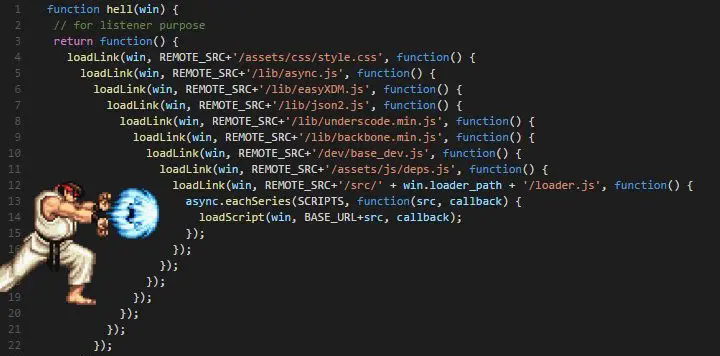
2.3 Callback Hell — When requirements become complex...

when we needRead three files sequentiallyThen things get ugly:
// Read first file1.txt, Read again file2.txt, last read file3.txt
fs.readFile('./file1.txt', 'utf-8', (err, data) => {
    if (!err) {
        console.log('file1.txt', data);
    } else {
        console.log(err);
    }

    // read file2.txt(Nested No. 1 layer)
    fs.readFile('./file2.txt', 'utf-8', (err, data) => {
        if (!err) {
            console.log('file2.txt', data);
        } else {
            console.log(err);
        }

        // read file3.txt(Nested No. 2 layer)
        fs.readFile('./file3.txt', 'utf-8', (err, data) => {
            if (!err) {
                console.log('file3.txt', data);
            } else {
                console.log(err);
            }
        });
    });
});
Did you see that? After reading only three files, there are already three levels of nesting. If there are a few more, the code becomespyramid structure, the readability is extremely poor, and it is even more of a nightmare to maintain. this is famousCallback Hell.
There are pictures and the truth
📚 3. From callback hell to async/await — the three evolutions of asynchronous
3.1 The first evolution: Promise + then chain call
ES6 introduced Promise, use chained calls instead of nesting:
import fs from 'fs/promises';

fs.readFile('./file1.txt', 'utf-8')
    .then(data => {
        console.log('file1.txt', data);
        return fs.readFile('./file2.txt', 'utf-8'); // return new Promise
    })
    .then(data => {
        console.log('file2.txt', data);
        return fs.readFile('./file3.txt', 'utf-8');
    })
    .then(data => {
        console.log('file3.txt', data);
    });
Much prettier than nesting! but .then().then().then() Like climbing stairs, it is still not intuitive when the amount of code is large.
3.2 The second evolution: async/await syntax sugar
ES8 (ES2017) introduced async/await, making asynchronous code look like synchronous code:
import fs from 'fs/promises';

(async () => {
    const file1Data = await fs.readFile('./file1.txt', 'utf-8');
    console.log('file1.txt', file1Data);

    const file2Data = await fs.readFile('./file2.txt', 'utf-8');
    console.log('file2.txt', file2Data);

    const file3Data = await fs.readFile('./file3.txt', 'utf-8');
    console.log('file3.txt', file3Data);
})();

console.log('This line will be executed first!'); // async/await Does not block the main thread
The code is clear and refreshing from top to bottom!await Helped us achieve itprocess control, no manual processing is required .then() chain.
3.3 Asynchronous evolution roadmap
Synchronization (blocking thread)
  ↓ Need high performance
asynchronous(Event Loop)
  ↓ Business becomes complex
callback function Callback
  ↓ nesting hell
Promise + .then()
  ↓ Chain calls are also cumbersome
async/await(ES8 Syntactic sugar)
🔑 Key understanding: The essence of async/await
| characteristic | illustrate |
|---|---|
| nature | The syntactic sugar of Promise, the bottom layer is still Promise |
| implement | await The code behind will entermicrotask queue |
| Not blocking | Will not block the main thread,setTimeout Wait for the macro task to execute normally |
| Syntactic sugar | Asynchronous code synchronization and improvementreadability |
| Error handling | Cooperate try/catch use, than .catch() More intuitive |
// try/catch handling errors
(async () => {
    try {
        const data = await fs.readFile('./non-existent file.txt', 'utf-8');
    } catch (err) {
        console.log('File read failed:', err.message);
    }
})();
💡 Summary of key points
- path.join vs path.resolve:join is pure splicing, resolve generates absolute paths. When encountering an absolute path, resolve will take it as the criterion
- Common APIs for path: dirname (directory name), basename (file name), extname (extension), normalize (normalization), parse (disassembly)
- fs synchronous vs asynchronous: Synchronous blocking threads, suitable for scripts; asynchronous non-blocking, suitable for servers
- callback hell: Nested callbacks lead to poor code readability and difficulty in maintenance.
- Asynchronous evolution route: Callback → Promise + then → async/await
- async/await essence: Syntactic sugar of Promise, which makes asynchronous code look synchronous but does not block the main thread.
🔗 References
- Node.js path module official documentation
- Node.js fs module official documentation
- MDN - async/await
💬 Exchange and discussion
What confusing points have you encountered while learning Node.js? Welcome to share and communicate in the comment area!
Find it useful? Like👍Collect⭐Follow👆, more practical Node.js tips will be updated in the future!