
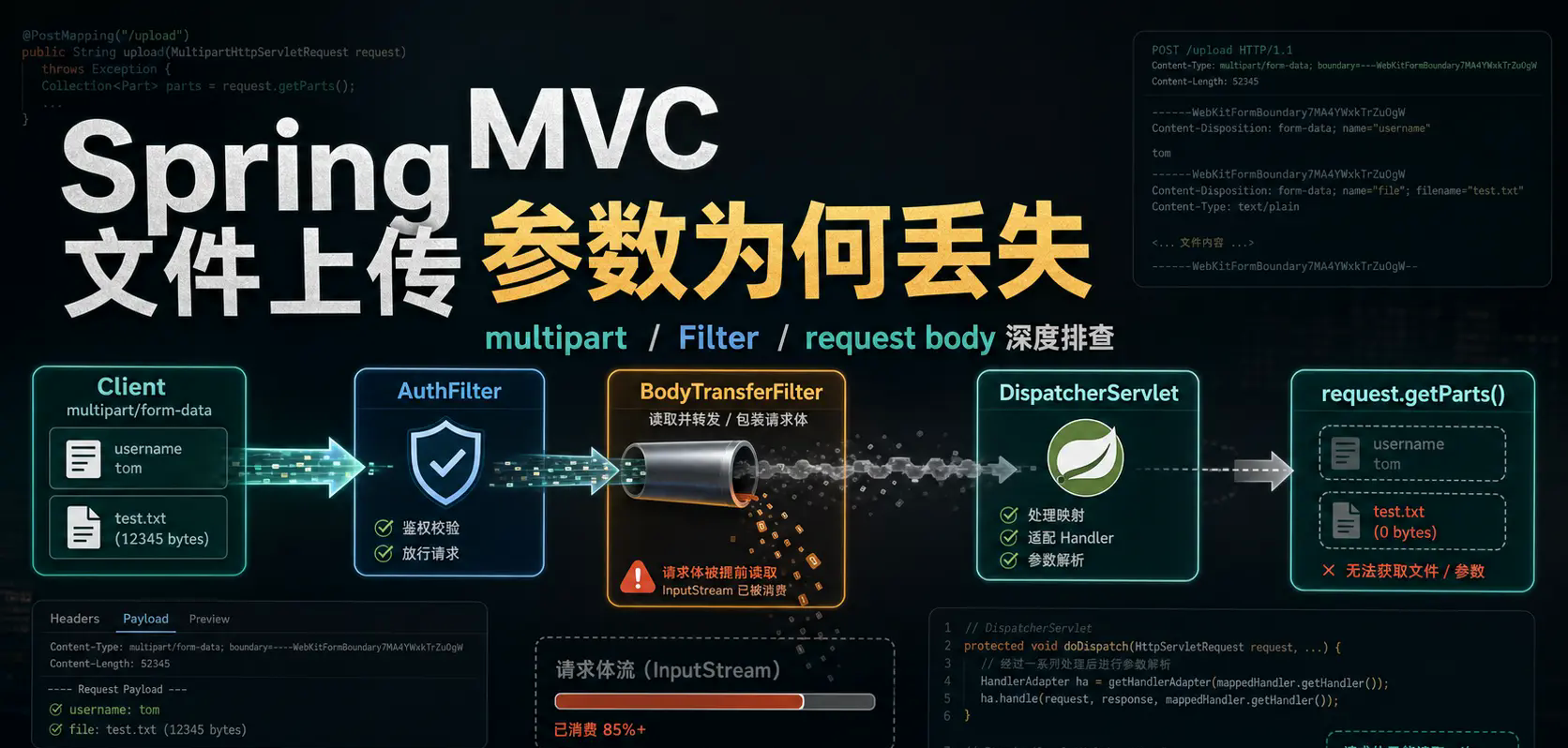
1. Background
Recently, I was troubleshooting a file upload problem in an old project, and the phenomenon was very counterintuitive.
Interface usage multipart/form-data Upload normal form fields and files at the same time. It seems that only the placement of the token is different, but the results received by the backend are completely different.
Method 1: Put the token in the URL parameters
curl --location --request PUT 'http://127.0.0.1:18000/test/upload?token=12345678910' \
  --form 'id="123"' \
  --form 'name="Zhang San"' \
  --form 'files=@"/Users/shepherdmy/Downloads/Image generated 1 (3).png"' \
  --form 'files=@"/Users/shepherdmy/Downloads/Image generated 1 (2).png"'
In this way, the backend can parse ordinary parameters and files normally.
Method 2: Put the token in the request header
curl --location --request PUT 'http://127.0.0.1:18000/test/upload' \
  --header 'token: 12345678910' \
  --form 'id="123"' \
  --form 'name="Zhang San"' \
  --form 'files=@"/Users/shepherdmy/Downloads/Image generated 1 (3).png"' \
  --form 'files=@"/Users/shepherdmy/Downloads/Image generated 1 (2).png"'
In this way, the backend cannot receive parameters and files.
At first glance, both requests appear to be Content-Type: multipart/form-data, both with normal fields and files. The only difference is that one token is placed in the query param and the other is placed in the header. It stands to reason that where the token is placed should not affect multipart parameter binding, but the actual result is inconsistent.
The backend interface is roughly as follows:
@PutMapping("/upload")
public void testUploadFile(UserParam param) {
    log.info("Start uploading files");
    log.info("parameter: {}", param);
    log.info("Number of files: {}", param == null ? 0 : param.getFiles().size());
}
There are both ordinary fields and file fields in the parameter object:
@Data
public class UserParam {
    private Long id;
    private String userNo;
    private String name;
    private List<MultipartFile> files;
}
During the investigation, we also found that some projects can receive the same Spring Boot version and the same interface writing method normally. id/name/files, some projects are not received at all.
Finally, it was determined that the problem was not in the way the Controller parameters were written, but before the request entered the Controller:multipart/form-data Whether it is correctly parsed by the Servlet container.
This troubleshooting basically involves drilling down layer by layer. Finally, Spring MVC, Servlet multipart parsing, Filter execution sequence,request.getParameter(...) The side effects are all linked together.
2. How Spring MVC parses multipart/form-data
Spring MVC's core link for processing multipart requests is roughly as follows:
DispatcherServlet
 -> checkMultipart(request)
 -> MultipartResolver.resolveMultipart(request)
 -> StandardMultipartHttpServletRequest
 -> request.getParts()
The key points are:
request.getParts()
If the project uses Servlet standard multipart parsing, Spring ends up with:
org.springframework.web.multipart.support.StandardMultipartHttpServletRequest#parseRequest
The core code is:
Collection<Part> parts = request.getParts();
In other words, Spring MVC does not manually disassemble the multipart body from the input stream, but calls the multipart parsing capability provided by the Servlet container.
Taking Tomcat as an example, the subsequent call link is roughly:
org.apache.catalina.connector.RequestFacade#getParts
org.apache.catalina.connector.Request#getParts
org.apache.catalina.connector.Request#parseParts
if request.getParts() The return is empty, and the subsequent Spring MVC parameter binding will naturally not be able to get ordinary form fields and file fields.
3. Root cause: The filter read the original request body in advance
There is a filter in the project that will do the original HttpServletRequest Make a wrapper to cache the request body. Its purpose is also very common: to solve the original HttpServletRequest#getInputStream() The problem can only be read once.
The original request stream can only be read once, essentially because the stream has a read position. The first reading will continuously advance the current position. When reading again for the second time, the position is already at the end, so naturally the content cannot be read. Although some streams support reset(), but the Servlet original input stream is not suitable for repeated reading in this way, so many projects will customize a request wrapper to first read the body into a byte array, and then repeatedly create the input stream from the cache.
This knowledge point was summarized in the article shared before:How Spring Boot elegantly improves interface data security If you are interested, you can jump to view it yourself
The sample code is as follows:
@Getter
public class RequestBodyWrapper extends HttpServletRequestWrapper {
private final byte[] body;
public RequestBodyWrapper(HttpServletRequest request) throws IOException {
super(request);
body = StreamUtils.copyToByteArray(request.getInputStream());
}
@Override
public ServletInputStream getInputStream() throws IOException {
final ByteArrayInputStream byteArrayInputStream = new ByteArrayInputStream(body);
return new ServletInputStream() {
@Override
public boolean isFinished() {
return false;
}
@Override
public boolean isReady() {
return false;
}
@Override
public void setReadListener(ReadListener readListener) {
}
@Override
public int read() throws IOException {
return byteArrayInputStream.read();
}
};
}
@Override
public BufferedReader getReader() throws IOException {
return new BufferedReader(new InputStreamReader(getInputStream()));
}
}
Unconditionally wrap requests in filters:
@Component
@Slf4j
public class BodyTransferFilter implements Filter {
@Override
public void doFilter(ServletRequest request, ServletResponse response, FilterChain chain)
throws IOException, ServletException {
RequestBodyWrapper requestBodyWrapper = null;
try {
requestBodyWrapper = new RequestBodyWrapper((HttpServletRequest) request);
} catch (Exception e) {
log.warn("requestBodyWrapper Error:", e);
}
chain.doFilter(Objects.isNull(requestBodyWrapper) ? request : requestBodyWrapper, response);
}
}
This type of writing usually works for ordinary JSON requests, but it is not suitable for multipart/form-data Very dangerous.
The problem lies in the wrapper constructor:
body = StreamUtils.copyToByteArray(request.getInputStream());
This line of code has consumed the body input stream of the original Tomcat request.
Although wrapper was subsequently rewritten:
getInputStream()
getReader()
But when parsing multipart, the key entry point for Spring call is:
request.getParts()
Instead of simply calling:
request.getInputStream()
getParts() It is the multipart parsing entrance of the Servlet container. When the container parses multipart, it relies on the internal state of the original request, the connector input stream,Content-Type, Content-Length, MultipartConfigElement and other information.
This custom wrapper just provides a new getInputStream(), and does not completely take over:
getParts()
getPart(String name)
getParameter(...)
getParameterMap()
getParameterValues(...)
So subsequent Spring MVC calls request.getParts() , it will still be delegated to the underlying original request. At this time, the input stream of the original request has been read in advance by the filter, and Tomcat will not be able to get the content when it parses the multipart.
The complete failed link is as follows:
Request entry Filter
 -> new RequestBodyWrapper(originalRequest)
 -> Constructor method reads originalRequest.getInputStream()
 -> original body consumed
 -> Enter DispatcherServlet
 -> checkMultipart(request)
 -> StandardMultipartHttpServletRequest#parseRequest
 -> request.getParts()
 -> Delegate to the bottom originalRequest.getParts()
 -> Tomcat The underlying input stream was found to have been consumed
 -> parts Empty or parsing failed
 -> Controller Unable to bind id/name/files
The flow chart is as follows:
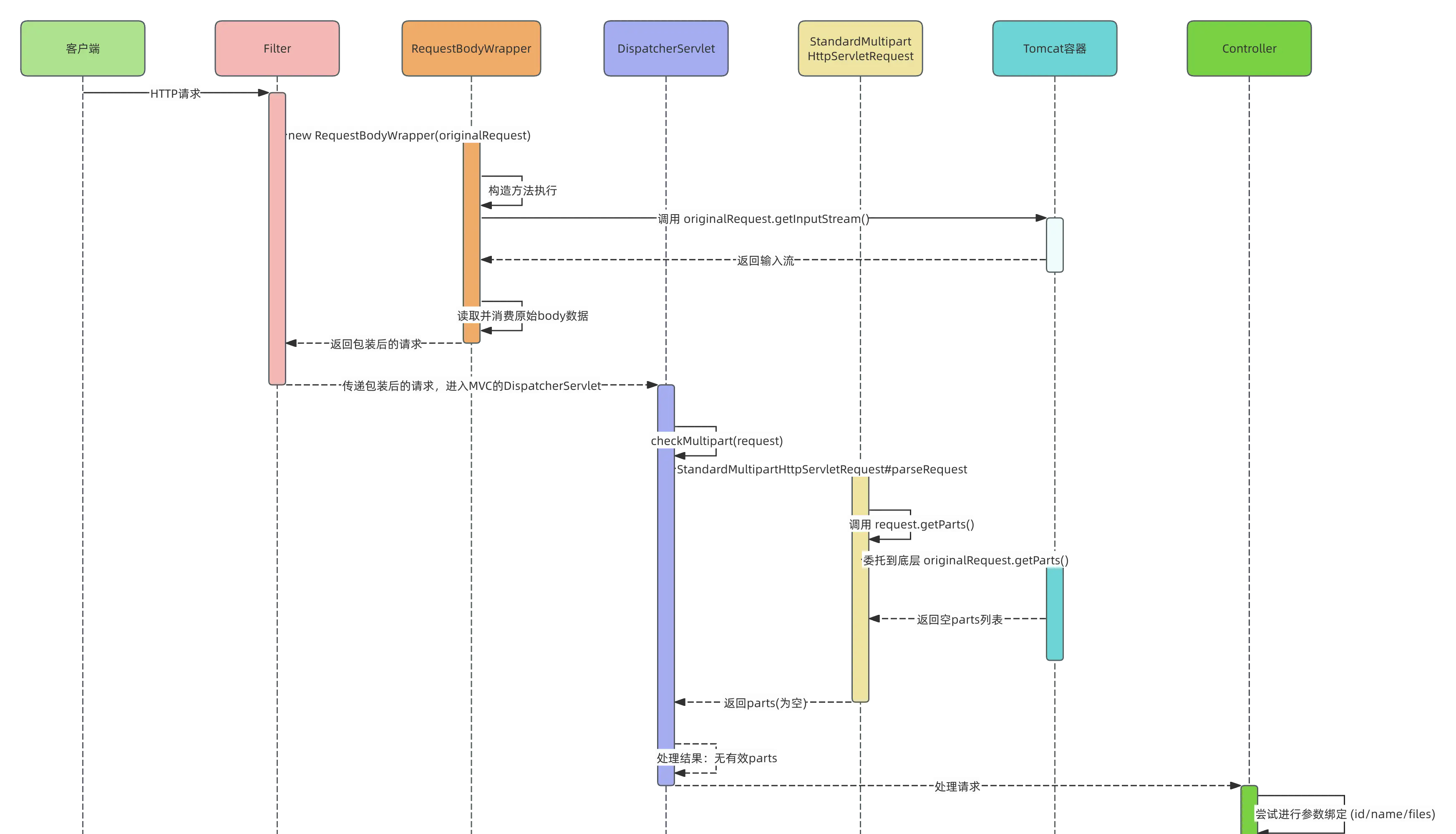
The most easily misjudged point here is:
rewrite getInputStream() Only calls directly to subsequent wrapper.getInputStream() The code is valid;
Servlet container getParts() multipart Parsing will not automatically use your cached ByteArrayInputStream.
So the conclusion is: Under normal circumstances, no matter the interface is POST still PUT, can pass multipart/form-data Pass parameters and files; but if before multipart parsing, there is something like BodyTransferFilter The filter reads the original request inputStream in advance, which may cause subsequent parameters and files to fail to be parsed.
4. Why does it fail to put the token in the header, but succeeds when placed in the query param?
So far, it has been able to explain "why the multipart parameters are lost", but it has not yet explained another more confusing phenomenon: why does the token fail when placed in the header, but succeeds when placed in the URL parameter?
The real reason is not that header affects multipart, but that the two token acquisition methods trigger different code paths.
There is a login verification filter in the project, similar to the following:
@Component
public class AuthFilter implements Filter {
@Override
public void doFilter(ServletRequest request, ServletResponse response, FilterChain chain)
throws IOException, ServletException {
HttpServletRequest httpServletRequest = (HttpServletRequest) request;
String token = httpServletRequest.getHeader("token");
if (StrUtil.isBlank(token)) {
token = httpServletRequest.getParameter("token");
}
if (StrUtil.isBlank(token)) {
throw new RuntimeException("tokencannot be empty");
}
chain.doFilter(request, response);
}
}
This filter is older than BodyTransferFilter implement.
When token is placed in header:
request.getHeader("token") valuable
 -> Get it directly token
 -> will not be called request.getParameter("token")
 -> multipart body Not parsed in advance
 -> Follow-up BodyTransferFilter Package request
 -> original request.getInputStream() read in advance
 -> DispatcherServlet Execute again request.getParts()
 -> parts Empty or parsing failed
 -> Controller Unable to bind id/name/files
When token is placed in URL parameters:
request.getHeader("token") No value
 -> implement request.getParameter("token")
 -> right multipart/form-data For example, this may trigger Servlet Container parses request parameters in advance
 -> multipart parts and parameter cached to original request internal
 -> Follow-up even BodyTransferFilter read body
 -> DispatcherServlet/Parameter binding may still get the parsed parameters
 -> Controller can be received id/name/files
Therefore, the difference between the two calling methods is not essentially:
header token Not supported multipart
Instead:
query param token Triggered request.getParameter("token");
header token no trigger request.getParameter("token").
request.getParameter(...) This is a very sensitive action for multipart requests. It may cause the servlet container to parse the body early. After successful early parsing, the parameters and file information have been cached inside the request; if not parsed in advance, and the original body is later read by the custom wrapper, Spring MVC will not be able to get the content when parsing the multipart.
Therefore, putting the token in the query param can receive parameters normally, just because it happens to trigger multipart early parsing. This is not a correct behavior by design, but a side effect of the stacking of multiple filter execution sequences and Servlet container parsing timing.
5. Why can the token be parsed wherever it is placed after changing PUT to POST?
In the project in question, another even more outrageous phenomenon occurred: changing the interface from PUT Change to POST Afterwards, whether the token is placed in header or query param, the backend can parse the parameters normally.
If you only look at multipart itself, this phenomenon can easily lead people astray. Because for Spring MVC,POST multipart/form-data and PUT multipart/form-data There is no essential difference, as analyzed previously DispatcherServlet -> checkMultipart -> request.getParts() Links can also illustrate this point.
The real difference comes from another filter:HiddenHttpMethodFilter.
Its core code is as follows:
protected void doFilterInternal(HttpServletRequest request,
HttpServletResponse response, FilterChain filterChain)
throws ServletException, IOException {
HttpServletRequest requestToUse = request;
if ("POST".equals(request.getMethod())
&& request.getAttribute("javax.servlet.error.exception") == null) {
String paramValue = request.getParameter(this.methodParam);
if (StringUtils.hasLength(paramValue)) {
String method = paramValue.toUpperCase(Locale.ENGLISH);
if (ALLOWED_METHODS.contains(method)) {
requestToUse = new HttpMethodRequestWrapper(request, method);
}
}
}
filterChain.doFilter(requestToUse, response);
}
The key points are very obvious:
String paramValue = request.getParameter(this.methodParam);
As long as it is POST ask,HiddenHttpMethodFilter will try to read _method parameter. this request.getParameter(...) It may also trigger the Servlet container to parse multipart requests in advance.
This explains why the interface was changed from PUT Change to POST Afterwards, the token can be parsed normally wherever it is placed: No POST is naturally more suitable for multipart, but POST hit HiddenHttpMethodFilter The logic triggers parameter parsing in advance.
HiddenHttpMethodFilter is not intended to handle file uploads, but to emulate traditional HTML forms with hidden fields PUT, DELETE, PATCH Wait for HTTP methods.
For example:
<form method="post" action="/user/1">
    <input type="hidden" name="_method" value="PUT">
</form>
Because HTML form natively only supports GET and POST, so Spring uses _method Parameters implement method override.
This filter can be enabled through the following configuration:
spring.mvc.hiddenmethod.filter.enabled=true
In front-end and back-end separation projects, if there is no need for traditional HTML form method override, it is usually not necessary to enable this filter. More importantly, you cannot rely on it to "conveniently" trigger multipart early parsing to cover up the problem.
6. Correctly modify the direction
The core principle of this type of problem is very simple:
Don't be here multipart Read raw before parsing request body.
If your project really needs to cache the request body, you should also skip the multipart request:
@Component
@Slf4j
public class BodyTransferFilter implements Filter {
@Override
public void doFilter(ServletRequest request, ServletResponse response, FilterChain chain)
throws IOException, ServletException {
String contentType = request.getContentType();
if (contentType != null
&& contentType.toLowerCase(Locale.ROOT).startsWith("multipart/")) {
chain.doFilter(request, response);
return;
}
RequestBodyWrapper requestBodyWrapper = null;
try {
requestBodyWrapper = new RequestBodyWrapper((HttpServletRequest) request);
} catch (Exception e) {
log.warn("requestBodyWrapper Error:", e);
}
chain.doFilter(Objects.isNull(requestBodyWrapper) ? request : requestBodyWrapper, response);
}
}
It is also recommended that the file upload interface be explicitly declared consumes:
@PostMapping(value = "/upload", consumes = MediaType.MULTIPART_FORM_DATA_VALUE)
public void testUploadFile(@ModelAttribute UserParam param) {
    log.info("Start uploading files");
    log.info("parameter: {}", param);
    log.info("Number of files: {}", param == null ? 0 : param.getFiles().size());
}
Don't write @ModelAttribute By default, complex objects will also be processed by model attribute binding; however, by explicitly writing it out in the upload interface, the code intention will be clearer and can also reduce misjudgments by subsequent maintainers.
Also, it is not recommended to rely on dependencies older than BodyTransferFilter exists in the executed filter request.getParameter(...), so that it "happens" to trigger the Servlet container to parse the body in advance. This behavior is too hidden and too dependent on execution order, and the problem may reappear if the filter order, framework version, or container behavior changes.
7. Summary
This type of problem appears to be that the Controller cannot receive parameters, but the actual root cause usually occurs before the request enters the Controller.
The core conclusions are as follows:
- Spring MVC standard multipart resolution final dependency
request.getParts(). - Customize
RequestBodyWrapperIf the original is read ahead of timerequest.getInputStream(), will destroy the subsequent multipart parsing of the Servlet container. - Override the wrapper
getInputStream(), does not mean that it completely takes over the Servlet containergetParts(). - The token can be parsed normally when placed in query param because the authentication logic is called
request.getParameter("token"), which may trigger multipart parsing early. - The token is placed in the header and is not triggered.
request.getParameter(...), so it is easier to expose the problem of body being read in advance. HiddenHttpMethodFiltercallrequest.getParameter("_method")It is also possible to trigger multipart parsing early, but this is a side effect and should not be relied upon.- In front-end and back-end separation projects, if there is no need for HTML form method override, you can turn it off
HiddenHttpMethodFilter. - The correct approach is: the filter skips multipart requests, do not read the upload request body before multipart parsing, and ensure that the Spring Boot multipart configuration takes effect normally.
Finally, I would like to emphasize: The most confusing part of this problem is not the complexity of a single point of knowledge, but the stacking of multiple "seemingly reasonable" component behaviors to form a very convoluted appearance. Only by stringing together the complete link from the Filter to the DispatcherServlet and then to the multipart parsing of the Servlet container can we truly understand what is happening and why.