
From "hell" to "stairs" to "synchronous writing": Node.js asynchronous twenty years and detailed explanation of the built-in fs module
summary: The fs module is the cornerstone of Node.js file operations. This article starts from the comparison between synchronization and asynchronousness, follows the evolutionary route of "synchronization → callback → Promise → async/await", dismantles the core API of the fs module, and sorts out the development history of JavaScript asynchronous programming.
📑 Table of Contents
- What is the fs module? Node.js’ file system capabilities
- Three API styles: synchronization, callback, and Promise
- Core API quick tour
- Synchronous vs asynchronous: The essential difference between blocking and non-blocking
- Callback hell: the pain points of asynchronous process control
- Promise + then: from "hell" to "stairs"
- async/await: synchronization of asynchronous code (final form)
- The evolution of JavaScript asynchronous programming
- A little summary
- interactive discussion
What is the fs module? Node.js’ file system capabilities
fs(File System) is one of the core modules of Node.js, providing various capabilities for interacting with the file system - reading files, writing files, creating directories, deleting files, monitoring file changes, etc. It can be understood as the "channel" through which Node.js operates the hard disk.
javascript
import fs from 'fs';           // traditional way
import fs from 'fs/promises';  // Promise method (recommended)
exist 3.mjs , I used the synchronous method to read the file:
javascript
const syncData = fs.readFileSync('./test.txt', 'utf-8');
console.log(syncData);
readFileSync yesblock- it will wait for the file to be read before continuing to execute the following code. This is fine in a simple script, but in a server environment it will block the main thread and affect the processing of other requests.
Three API styles: synchronization, callback, and Promise
All operations of the fs module are provided in three forms:
| style | Features | Applicable scenarios |
|---|---|---|
| Sync | Blocks the event loop and throws exceptions directly | Simple script, startup configuration phase |
| Callback | Non-blocking, the last parameter is the callback function | Traditional asynchronous programming |
| Promise | Non-blocking, support async/await | Modern recommendation method |
Comparison of three styles:
javascript
// 1. Synchronous style - blocking
try {
    const data = fs.readFileSync('./file.txt', 'utf8');
    console.log(data);
} catch (err) {
    console.error(err);
}

// 2. Callback style - non-blocking
fs.readFile('./file.txt', 'utf8', (err, data) => {
    if (err) console.error(err);
    else console.log(data);
});

// 3. Promise Style - Non-blocking (recommended)
import fs from 'fs/promises';
const data = await fs.readFile('./file.txt', 'utf8');
Core API quick tour
File reading and writing
| method | effect | Synchronized version | Promise version |
|---|---|---|---|
readFile | Read the entire file content | readFileSync | fs/promises in readFile |
writeFile | Write file contents (overwrite) | writeFileSync | fs/promises in writeFile |
appendFile | Append content to the end of the file | appendFileSync | fs/promises in appendFile |
copyFile | Copy files | copyFileSync | fs/promises in copyFile |
unlink | Delete files | unlinkSync | fs/promises in unlink |
flags parameter of writeFile:
'w': Write (default), overwrite existing content'a': Append'wx': Exclusive writing, failure if the file already exists
Directory operations
| method | effect | Synchronized version | Promise version |
|---|---|---|---|
mkdir | Create directory | mkdirSync | fs/promises in mkdir |
readdir | Read a list of directory contents | readdirSync | fs/promises in readdir |
rmdir | Delete empty directories | rmdirSync | fs/promises in rmdir |
rm | Delete a file or directory (recommended) | rmSync | fs/promises in rm |
Recursively create parent directories when creating directories:
javascript
await fs.mkdir('./a/b/c', { recursive: true });
// automatically created a → a/b → a/b/c, No error will be reported if the directory already exists
File information
| method | effect | Promise version |
|---|---|---|
stat | Get file/directory details | fs/promises in stat |
access | Check file existence and permissions | fs/promises in access |
javascript
const stats = await fs.stat('./file.txt');
stats.isFile()      // Is it a file
stats.isDirectory() // Is it a directory?
stats.size          // File size (bytes)
Synchronous vs asynchronous: The essential difference between blocking and non-blocking
The core advantage of Node.js isAsynchronous non-blocking I/O. Why is this so important?
exist 3.mjs , I tested the synchronous and asynchronous behavior respectively:
javascript
// Synchronization: blocking the main thread
const syncData = fs.readFileSync('./test.txt', 'utf-8');
console.log(syncData);
console.log('111');  // You must wait until the file is read before executing

// Asynchronous: does not block the main thread
fs.readFile('./test1.txt', 'utf-8', (err, data) => {
    if (!err) console.log(data);
});
console.log('111');  // Execute immediately without waiting for the file to be read.
In synchronous mode,console.log('111') Wait until the file is read before executing. If the file is large, the main thread will always be occupied and other requests cannot be processed.
In asynchronous mode,fs.readFile Hand over the reading task to the bottom layer (libuv), and the main thread will execute it immediately console.log('111'). After the file is read, the callback is executed through the event loop. This is the underlying principle why Node.js can support high concurrency.
The bottom layer of Node.js is written in C++ (fs, path and other modules), and encapsulates the V8 engine to parse JavaScript. Asynchronous I/O is implemented by the libuv library so that the main thread never blocks.
Callback hell: the pain points of asynchronous process control
Before Promises, Node.js used callback functions to handle asynchrony. If multiple asynchronous tasks have sequential requirements, callbacks need to be nested within callbacks, forming a "callback hell".
exist 3.mjs , I simulated the needsequential readingThree file scenario:
javascript
fs.readFile('./file1.txt', 'utf-8', (err, data) => {
    if (!err) {
        console.log('file1', data);
    }
    fs.readFile('./file2.txt', 'utf-8', (err, data) => {
        if (!err) {
            console.log('file2', data);
        }
        fs.readFile('./file3.txt', 'utf-8', (err, data) => {
            if (!err) {
                console.log('file3', data);
            }
        });
    });
});
The problem with this code is obvious:
- Indentation gets deeper and deeper, like a pyramid
- Difficult to read and maintain, the logic is "swamped" by nesting
- Duplicate error handling, each callback must be checked
err - Difficult to scale, if you add one more step, you need to wrap it with another layer.
this is famouscallback hell(Callback Hell) - The code goes down layer by layer like eighteen levels of hell, and it is almost unbearably complicated.
Promise + then: from "hell" to "stairs"
ES6 introduced Promise, turning nested structures into chained structures. exist 4.mjs , I achieved the same requirement:
javascript
import fs from 'fs/promises';

fs.readFile('./file1.txt', 'utf-8')
    .then(data => {
        console.log('file1', data);
        return fs.readFile('./file2.txt', 'utf-8');
    })
    .then(data => {
        console.log('file2', data);
        return fs.readFile('./file3.txt', 'utf-8');
    })
    .then(data => {
        console.log('file3', data);
    });
The changes are obvious:
- fromNestedbecameTile
- From "callback hell" to "stair climbing"
- Clear semantics:
thenIt’s “then do the next thing.” - Unified error handling: you can use one
.catch()catch all errors
But the chain call still seems cumbersome, and each step must be written return and then. Could it be simpler?
async/await: synchronization of asynchronous code (final form)
ES8 is launched async/await. It's not a new mechanism; Promise.then chain callSyntactic sugar. But it makes asynchronous code written closer to synchronous code.
Let’s first look at the intuitive comparison of the three writing methods - the sameRead three files sequentially, the differences between callback, Promise.then and async/await are clear at a glance:
callback version (callback hell)
javascript
fs.readFile('./file1.txt', 'utf-8', (err, data) => {
    if (!err) {
        console.log('file1', data);
    } else {
        console.log(err);
    }
    fs.readFile('./file2.txt', 'utf-8', (err, data) => {
        if (!err) {
            console.log('file2', data);
        } else {
            console.log(err);
        }
        fs.readFile('./file3.txt', 'utf-8', (err, data) => {
            if (!err) {
                console.log('file3', data);
            } else {
                console.log(err);
            }
        });
    });
});
Promise.then version (chained)
javascript
fs.readFile('./file1.txt', 'utf-8')
    .then(data => {
        console.log('file1', data);
        return fs.readFile('./file2.txt', 'utf-8');
    })
    .then(data => {
        console.log('file2', data);
        return fs.readFile('./file3.txt', 'utf-8');
    })
    .then(data => {
        console.log('file3', data);
    });
async/await version (simplest)
javascript
(async () => {
    const file1Data = await fs.readFile('./file1.txt', 'utf-8');
    console.log('file1', file1Data);
    const file2Data = await fs.readFile('./file2.txt', 'utf-8');
    console.log('file2', file2Data);
    const file3Data = await fs.readFile('./file3.txt', 'utf-8');
    console.log('file3', file3Data);
})();
Comparison of three versions:
| Dimensions | callback | Promise.then | async/await |
|---|---|---|---|
| Lines of code | Most (21 lines) | Medium (12 lines) | Minimum (7 lines) |
| Indent level | 3 levels of nesting | 1 layer tiling | 0 layer tiling |
| Error handling | Repeat check for each layer | unified catch | try/catch |
| readability | Poor (nested hell) | Better (chained) | Good (like synchronous code) |
Key understanding: This is not a degeneration into synchronization. The three tasks areasynchronousExecuted, just by await Controlled the process - had to wait file1Data Only after you get it can you execute the subsequent code. exist await During the waiting period, the main thread can handle other things. This is the essence of "non-blocking".
await Helps us realize process control, no need to write manually then chain. It is just a simplification of the writing method, and the underlying asynchronous and non-blocking nature remains unchanged.
async/awaitThe essence is that "the writing method becomes synchronous, but the operation is still asynchronous." It does not create a new mechanism, but allows developers to write asynchronous code in a more natural way. It is very important to understand this:async/awaitMake asynchronous codelooks like sync, but it does not turn asynchronous into synchronous. The main thread is inawaitwill be "given up" to handle other tasks, and execution will resume after the Promise is completed.
The evolution of JavaScript asynchronous programming
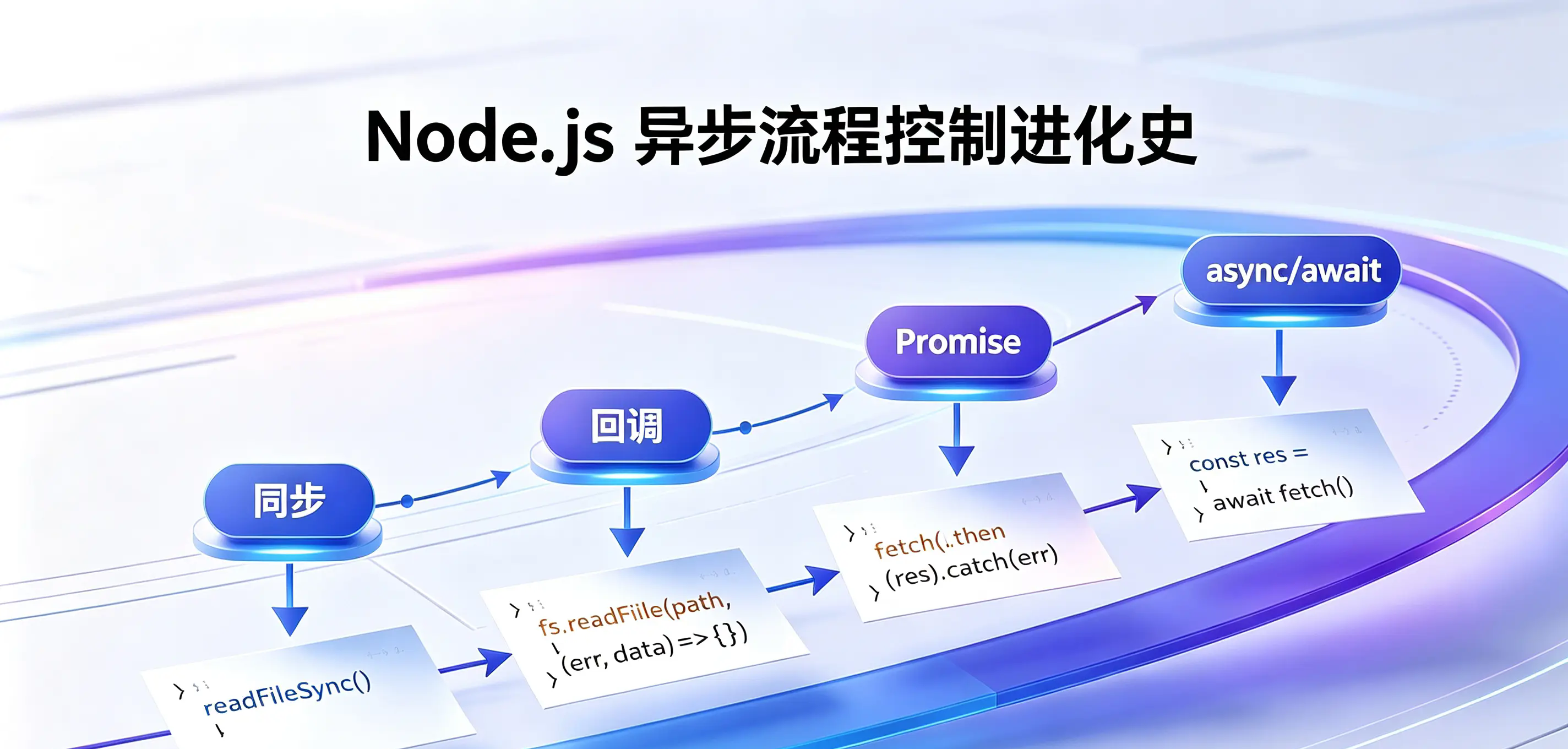
from 3.mjs and 4.mjs In the comments, you can clearly see the evolution path of JavaScript asynchronous programming:
text
Synchronous (blocking)
    ↓
asynchronous(event loop + callback)
    ↓
Complex process control → callback hell
    ↓
Promise + then(Chained, improved readability)
    ↓
async/await(Syntax sugar, synchronize asynchronous code)
| stage | Represent technology | Features |
|---|---|---|
| synchronous | readFileSync | Simple and straightforward, but blocks the main thread |
| Asynchronous callback | readFile + callback | Non-blocking, but easy to fall into callback hell |
| Promise chain | readFile + .then() | Chain calls to solve nesting problems |
| async/await | await readFile() | Syntax sugar, the most concise code |
async/await It's not a new mechanic; Promise syntactic sugar. The essence of asynchronousness has not changed, what has changed is the way we write code.
A little summary
- The fs module is the core of Node.js file operations, providing three styles: synchronization, callback, and Promise.
- Asynchronous non-blocking I/O for Node.js It is the foundation of its high performance, supported by the C++ layer and libuv library.
- callback hell It is an early pain point of asynchronous process control. The code is deeply nested, has poor readability, and is difficult to maintain.
- Promise + then Turn nesting into a chain to solve the problem of callback hell, but the writing method is still a bit cumbersome.
- async/await It is the syntactic sugar of Promise, making asynchronous code look like synchronous. It is currently the most recommended way of writing.
- The entire evolutionary path: Synchronization → Callback → Callback Hell → Promise.then → async/await (asynchronous code synchronization).
async/awaitThe essence is that "the writing method becomes synchronous, but the operation is still asynchronous." It does not create a new mechanism, but allows developers to write asynchronous code in a more natural way.
interactive discussion
- What is the fundamental difference between synchronous and asynchronous? Why does Node.js choose an asynchronous non-blocking model?
- Besides poor readability, are there any practical problems with callback hell? Such as error handling and process control?
Promise.thenIn a chain call, if an error occurs in a step, subsequentthenWill it still be implemented?async/awaitandPromise.thenThe essence is the same, then useasync/awaitWhat are the benefits? Are there any disadvantages?- do you prefer to use
Promise.thenstillasync/await? Why?
📌 A little insight: Only by understanding the evolutionary history of JavaScript asynchronous programming can we truly understand
async/awaitvalue. It is not for "showing off skills", but for developers to handle asynchronous logic in a more natural way.