
A front-end learner
pathandfsNotes on pitfalls: First find the correct path, and then write the asynchronous code smoothly.
Introduction
When I first started learning Node.js file operations, my first reaction was very straightforward: just read files.readFileSync A shuttle.
import fs from 'node:fs';
const data = fs.readFileSync('data.txt', 'utf-8');
console.log(data);
The moment the code runs through, I really feel a sense of accomplishment. It wasn’t until later that I continuously processed multiple files in the script, and even wrote synchronous I/O into the interface logic, that I realized the problem:One of the advantages of Node.js is non-blocking I/O, and synchronous file operations will hold the main thread in place and wait.
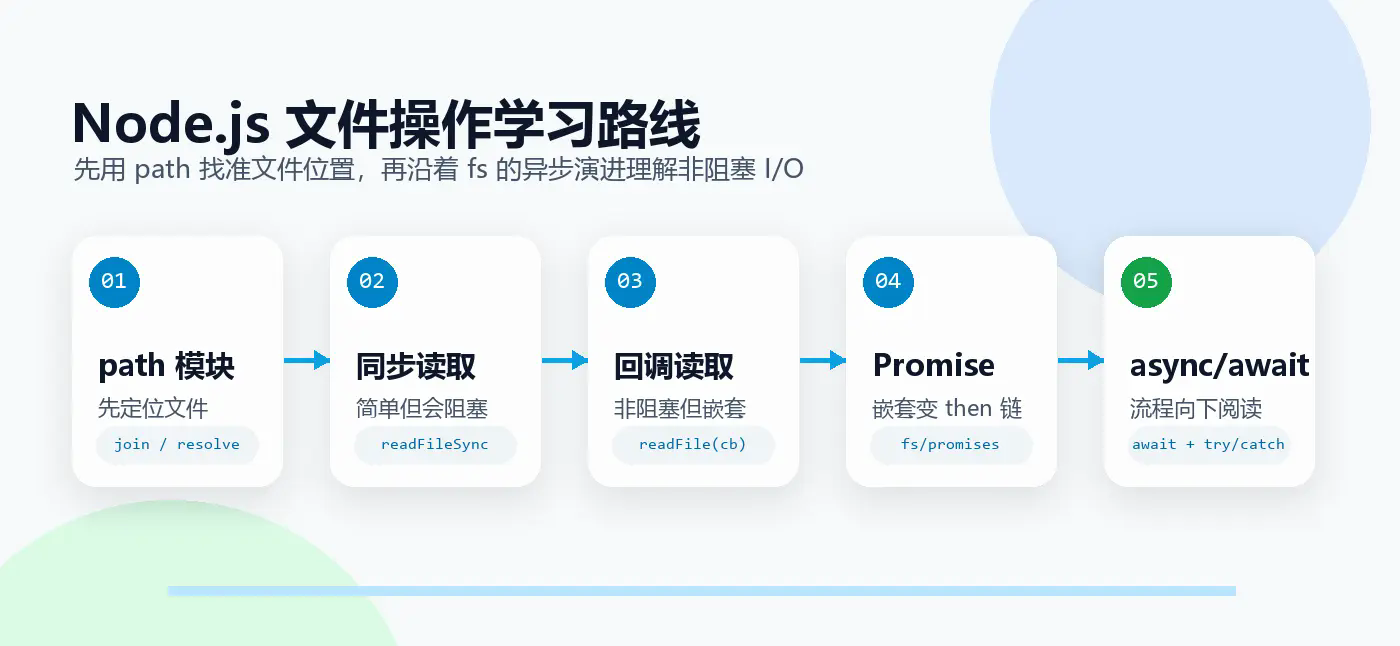
This article is compiled by me path and fs A learning route during the module:
- First figure out the file path:
path.join()andpath.resolve()What’s the difference? - Then understand file reading: what problems are solved by synchronization, callback, Promise, and async/await respectively;
- Finally, we summarize how to choose in a real project.
1. Before operating files, first figure out the path.
Before operating files, the most easily overlooked issues are:Where are the files?
A path is like the address of a file. You can say "201, Building 3, Xingfu Community", or "Start from the current location, turn left and then turn right." In Node.js,path Modules are tools specifically designed to handle this type of "address".
Two of the most confusing methods are:
path.join(): Put together the path fragments and normalize the results;path.resolve(): Parse the path fragment into an absolute path.
1.1 path.join():path splicer
path.join() The core responsibility is to splice path fragments and handle redundant separators,., ...
import path from 'node:path';
console.log(path.join('a', 'b', 'c'));
// a/b/c
console.log(path.join('a', '/b', 'c'));
// a/b/c
console.log(path.join('a', '..', 'b'));
// b
It's great for splicing relative paths, but be careful:join() Absolute paths are not guaranteed to be returned.
console.log(path.join('src', 'assets', 'logo.png'));
// src/assets/logo.png
If the first fragment itself is not an absolute path, the result is usually not an absolute path either.
1.2 path.resolve():Absolute path parser
path.resolve() More like a navigation system. It processes path segments from right to left until an absolute path is constructed.
console.log(path.resolve('a', 'b', 'c'));
// current working directory/a/b/c
console.log(path.resolve('/hello', 'world'));
// /hello/world
console.log(path.resolve('/hello', 'world', '/a', 'b'));
// /a/b
There are two key points in these examples:
- If all the paths passed in are relative paths,
resolve()will be based onprocess.cwd()Complete the absolute path; - If you encounter
/The beginning fragment and the previous fragments will be "reset".
That is to say,resolve() The goal is not to simply splice, but to get aThe absolute path where the file can be located.
1.3 join and resolve How to choose?
I have stepped into a small pit before: I want to be in src/app.js Read in the project root directory config.json.
The project structure is roughly like this:
project/
├── src/
│   └── app.js
└── config.json
If you write this in CommonJS:
const configPath = path.join(__dirname, '/config.json');
Many people will think /config.json will bring the path back to the root directory, but join() It will be treated as an ordinary path fragment, and the result will still be src Find the file in the directory.
A more clear way of writing it is:
const configPath = path.resolve(__dirname, '../config.json');
If you are writing ESM, that is, use import module, you need to get the current file directory yourself first:
import path from 'node:path';
import { fileURLToPath } from 'node:url';
const __filename = fileURLToPath(import.meta.url);
const __dirname = path.dirname(__filename);
const configPath = path.resolve(__dirname, '../config.json');
My understanding can be summarized in this table:
| scene | Recommended method | reason |
|---|---|---|
| Want to get the absolute path | path.resolve() | The result is always an absolute path, making the positioning clearer |
| Splice multiple path segments | path.join() | Concise, automatically handle redundant separators |
| Find files based on current working directory | path.resolve() | Will combine process.cwd() |
| Find files based on current file directory | Both can be used | The key is to get the right one first __dirname or equivalent value |
1.4 Commonly used path Tool method
Apart from join and resolve, I also compiled several common methods in practice:
console.log(path.dirname('a/b/c.js'));
// a/b

console.log(path.basename('a/b/c.js'));
// c.js

console.log(path.basename('a/b/c.js', '.js'));
// c

console.log(path.extname('a/b/c.js'));
// .js

console.log(path.normalize('a/b//c/d/e/..'));
// a/b/c/d

console.log(path.parse('home/user/dir/file.txt'));
// {
//   root: '',
//   dir: 'home/user/dir',
//   base: 'file.txt',
//   name: 'file',
//   ext: '.txt'
// }
These methods may seem basic, but they are very useful when writing scripts. For example, scanning Markdown files in batches, filtering files based on extensions, extracting file names from paths, etc. are all inseparable from them.
2. Synchronous reading: easiest to understand and easiest to block
finally arrived fs module.
fs It is the abbreviation of File System and is used to operate files and directories. The most intuitive way to read is to read synchronously:
import fs from 'node:fs';

const syncData = fs.readFileSync('test.txt', 'utf-8');
console.log(syncData);
console.log('After reading the file I execute');
This code is easy to understand:
- implement
readFileSync; - Wait until the file reading is completed;
- Print file contents;
- Continue executing the following code.
The advantage of synchronous writing is simplicity, but the disadvantages are also very obvious:It blocks the main thread.
If you just write a one-time script and read a few small local files, the synchronization method is not a big problem. But if you use it in the request processing function of the web service readFileSync, when a request reads a file, the entire Node.js process has to wait for the I/O to end, and other requests will also be affected.
It can be recorded like this:
| scene | Suitable for synchronous I/O |
|---|---|
| Read configuration on startup | acceptable |
| One-time local script | acceptable |
| Read files in Express/Koa routing | Not recommended |
| High-concurrency service handles user requests | Try to avoid |
3. Asynchronous callback: No longer blocking, but the code begins to deform
A more common approach in Node.js is asynchronous I/O:
import fs from 'node:fs';

fs.readFile('./test.txt', 'utf-8', (err, data) => {
  if (err) {
    console.error(err);
    return;
  }

  console.log(data);
});

console.log('After reading the file I execute');
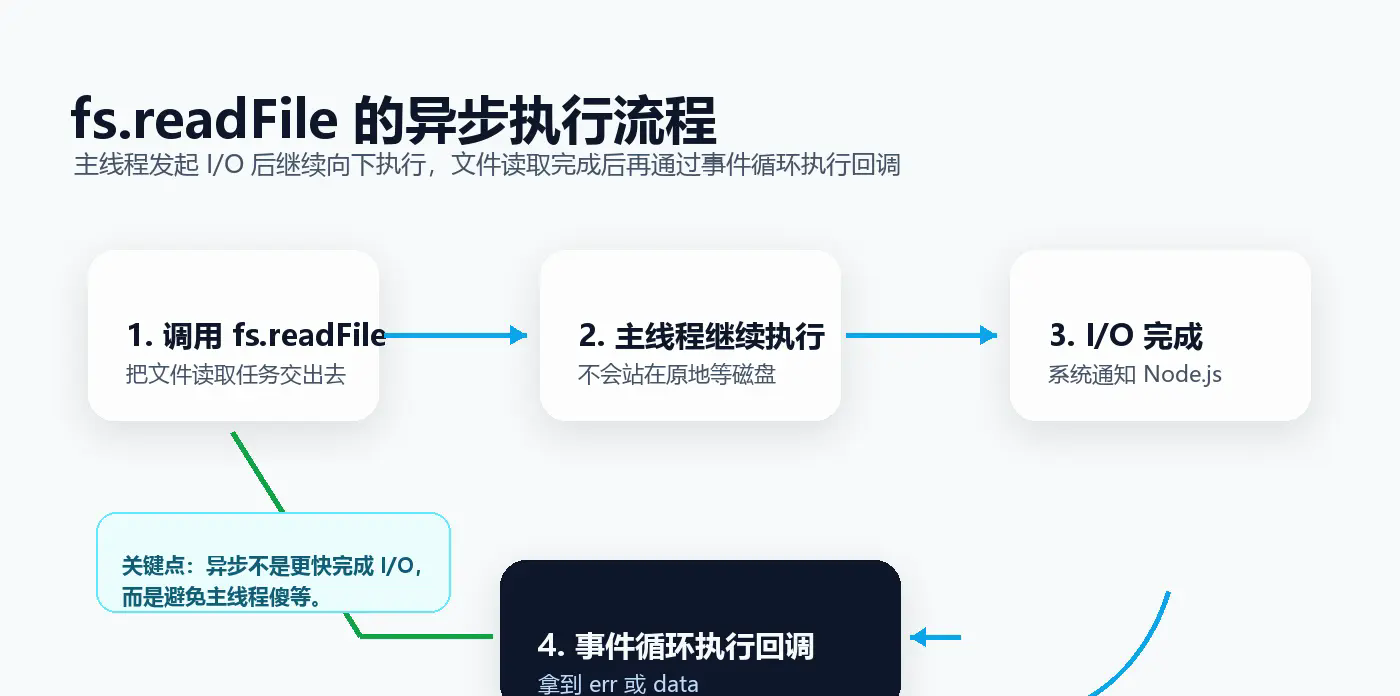
This time the order of execution is different:
- call
fs.readFile, hand over the reading task; - The main thread continues to execute downward;
- After the file reading is completed, the callback function is put back into the event loop for execution;
- Get it in the callback
errordata.
This is what non-blocking I/O smells like.
3.1 Why does Node.js like asynchronous?
The main JavaScript thread of Node.js can only execute one piece of JS code at a time. If the main thread is stuck on a time-consuming task, subsequent requests will have to be queued.
However, for I/O operations such as file reading and network requests, the really time-consuming part is not the JS calculation, but waiting for the disk or system call to return. The idea of Node.js is:Don't wait stupidly on the main thread, hand over the I/O, and wait for the results to come back before continuing processing.
So asynchronous callback solves the problem of synchronous blocking, but it also brings new troubles.
3.2 Callback Hell: When process control becomes deeper and deeper
If you just read a file, the callback writing method is fairly clear. But once the business needs to "read A first, then read B based on A, and finally read C", the code will start to grow to the right:
fs.readFile('./file1.txt', 'utf-8', (err, data1) => {
  if (err) {
    console.error(err);
    return;
  }

  console.log(data1);

  fs.readFile('./file2.txt', 'utf-8', (err, data2) => {
    if (err) {
      console.error(err);
      return;
    }

    console.log(data2);

    fs.readFile('./file3.txt', 'utf-8', (err, data3) => {
      if (err) {
        console.error(err);
        return;
      }

      console.log(data3);
    });
  });
});
This is often referred to as Callback Hell.
Its problem is not just that the indentation becomes deeper:
- Each layer must be processed repeatedly
err; - The main process is buried in callbacks;
- If there are too many conditional branches, the code will be more difficult to read;
- If you want to split the function for reuse, it will become awkward.
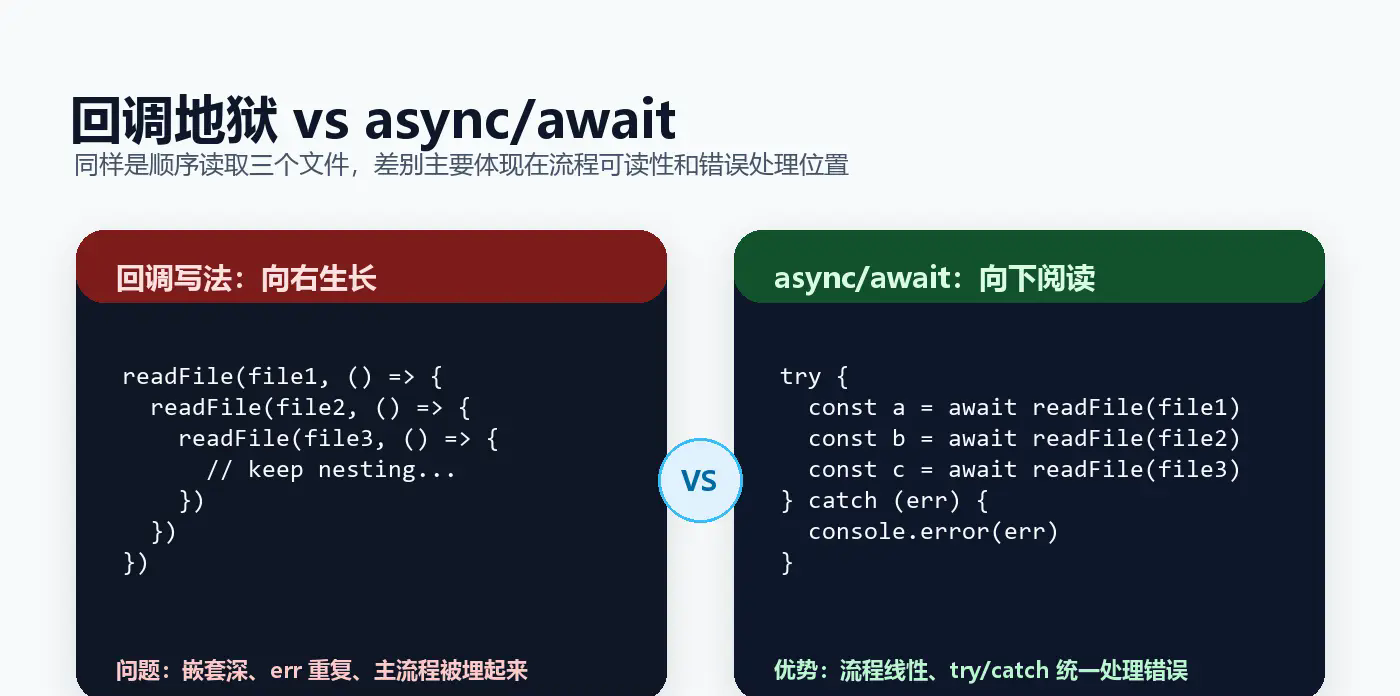
My feeling is: callbacks make Node.js run more smoothly, but make people more tired when reading the code.
4. Promise: Change nesting into chain process
In order to solve callback nesting, Promise appears.
In modern Node.js, you can use it directly node:fs/promises:
import fs from 'node:fs/promises';

fs.readFile('./file1.txt', 'utf-8')
  .then((data1) => {
    console.log(data1);
    return fs.readFile('./file2.txt', 'utf-8');
  })
  .then((data2) => {
    console.log(data2);
    return fs.readFile('./file3.txt', 'utf-8');
  })
  .then((data3) => {
    console.log(data3);
  })
  .catch((err) => {
    console.error('Failed to read file: ', err);
  });
Compared with callbacks, the changes in Promise are obvious:
- Nesting becomes chained calls;
- Errors can be handed over to the end
.catch(); - every step
returnA Promise, the next step will wait for it to complete.
Promise has three states:
pending   -> Waiting
fulfilled -> Successfully
rejected  -> failed
Commonly used static methods are also very practical:
const [data1, data2, data3] = await Promise.all([
  fs.readFile('./file1.txt', 'utf-8'),
  fs.readFile('./file2.txt', 'utf-8'),
  fs.readFile('./file3.txt', 'utf-8'),
]);
Promise.all() Suitable for scenarios where multiple tasks are independent of each other and can be executed in parallel. compared to one await, which can reduce waiting time.
But the then chain is not a perfect answer either. If there are too many steps, it will still become longer; when the conditional branch is complex, the readability will also decrease.
Now it’s async/await’s turn.
5. async/await: Make asynchronous code look like a synchronous process
async/await is syntactic sugar for Promise. It doesn't turn asynchronous into synchronous, nor does it block the entire main thread; it just allows us to organize asynchronous processes in a way that is closer to synchronous code.
import fs from 'node:fs/promises';

async function readFiles() {
  try {
    const data1 = await fs.readFile('./file1.txt', 'utf-8');
    console.log('file1', data1);

    const data2 = await fs.readFile('./file2.txt', 'utf-8');
    console.log('file2', data2);

    const data3 = await fs.readFile('./file3.txt', 'utf-8');
    console.log('file3', data3);
  } catch (err) {
    console.error('Failed to read file: ', err);
  }
}

readFiles();
This code reads like a synchronous process, but underneath it's still Promises:
asyncFunctions always return Promise;awaitWill wait for the Promise on the right to settle;- When Promise is rejected,
awaitwill throw an exception, you can usetry...catchcapture.
5.1 Serial or parallel depends on whether the task has dependencies
If the latter file must depend on the results of the previous file, it should be serialized:
const configText = await fs.readFile('./config.json', 'utf-8');
const config = JSON.parse(configText);

const data = await fs.readFile(config.dataPath, 'utf-8');
If several files do not depend on each other, they can be parallelized:
const [file1, file2, file3] = await Promise.all([
  fs.readFile('./file1.txt', 'utf-8'),
  fs.readFile('./file2.txt', 'utf-8'),
  fs.readFile('./file3.txt', 'utf-8'),
]);
Here is a point that is easily confused when learning:await Just because it's written like synchronous, doesn't mean it's suitable for mindless serialization. If you can do I/O in parallel, don't wait one after the other.
5.2 How to write in the loop await?
If you need to process files sequentially, you can use for...of:
async function readInOrder(fileNames) {
  const results = [];

  for (const fileName of fileNames) {
    const data = await fs.readFile(fileName, 'utf-8');
    results.push(data);
  }

  return results;
}
Don't use forEach match await to express "wait in order", because forEach Does not wait for the internal asynchronous callback to complete.
If there are no sequential dependencies between files, you can directly map into a Promise and then hand it over Promise.all():
async function readTogether(fileNames) {
  return Promise.all(
    fileNames.map((fileName) => fs.readFile(fileName, 'utf-8')),
  );
}
6. My practical suggestions
After finishing this round of learning, my choices for Node.js file operations are roughly as follows:
| Writing method | advantage | shortcoming | Applicable scenarios |
|---|---|---|---|
readFileSync | Simple and intuitive | Block main thread | Startup configuration, one-time scripts |
fs.readFile callback | non-blocking | Easy to nest and repeat error handling | When maintaining old code, you will encounter |
fs/promises + .then() | Chain process, unified capture of errors | Even though the chain is long, it’s still not refreshing enough | Scenarios that require combining Promise |
fs/promises + async/await | Best readability, close to synchronous process | It is easy to mistakenly write as meaningless serial | Daily recommended writing methods |
Let me add a few more habits that I will follow in the project:
- New codes are given priority
node:fs/promisesand async/await; - Use path processing as much as possible
path.resolve()Get an explicit absolute path; - Avoid synchronous file I/O during server-side request processing;
- If there are dependencies, it will be serialized. If there are no dependencies, it will be serialized.
Promise.all()parallel; awaitRemember to design error handling in the outer layer so that exceptions do not quietly turn into unhandled Promise rejections.
Conclusion
from readFileSync From callbacks to Promise and async/await, the evolution of Node.js file operations is actually constantly answering the same question:
How to write the asynchronous process more clearly without blocking the main thread?
Callbacks solve the blocking problem, but bring nesting hell; Promise flattens the nesting into a chain; async/await writes the chain process back to a near-synchronous state.
But I think when learning, don’t jump directly to async/await and call it a day. Only by understanding what problems callbacks and Promise have solved can we truly understand why async/await is so useful, and we can avoid misusing it as "serial waiting disguised as asynchronous".
Next time I write a file operation script, I will ask myself three questions:
- Is this path stable and clear?
- Will this file operation block online requests?
- Should these asynchronous tasks be serialized, or can they be parallelized?
Can answer these three questions clearly?path and fs It is no longer just a few APIs, but a tool that can truly serve engineering practice.