
On June 18, Claude Code quietly launched the Artifacts publishing function, and there has been almost no discussion in the Chinese community. I took a real research task and ran it through it completely: from data collection and analysis toPublish into a shareable interactive web page in one sentence, without leaving the terminal during the whole process. This article explains clearly what it is, how to use it, where the pitfalls are, and finally attaches a real case.
1. Look at the effect first
I asked Claude Code to conduct a survey on the "WeChat Official Account AI Track" and ended with this sentence:
Organize research data and conclusions into reports and publish them
A few minutes later, it sent me a link, and I clicked on a page like this:
- 30-day WeChat IndexInteractive line chart(with hover crosshair and tooltip)
- Complete data table of competitive product landscape and hot article list
- Automatically adapt to light/dark themes
- An independent URL, send it to friends in WeChat and open it directly


No warehouse built, no npm run build, no Vercel/GitHub Pages, not a single deployment action. This is Claude Code Artifacts.
2. This is not the same thing as the Artifacts of 2024
When many people see "Artifacts", their first reaction is the preview panel on the right side of the claude.ai chat page - that is an old feature launched with Claude 3.5 Sonnet in June 2024. this time Claude Code Artifacts (launched June 18, 2026) Same origin but completely different positioning:
| Dimensions | Old Artifacts (2024) | Claude Code Artifacts(2026.6) |
|---|---|---|
| where | claude.ai chat sidebar | Standalone URL:claude.ai/code/artifact/<id> |
| who can see | View only in session | The link can be shared and opened in any browser |
| life cycle | Follow the chat history | Durable hosting and will not be automatically deleted |
| renew | In-session regeneration | Republish the same file = original URL updated in place |
| manage | none | claude.ai/code/artifacts Centralized management, version history |
Bottom line: Old Artifacts are "Preview", new Artifacts are "Delivery".
3. How to use: Zero configuration, just one sentence
In the session of Claude Code (CLI / Desktop / Web / IDE plug-in), use natural language directly:
Help me make this analysis result into a web report and publish it as artifact
Claude will write an HTML (or Markdown) file, then call the built-in Artifact tool to publish and return a link. You can also specify the content shape:
Make a data dashboard and use it for charts SVG, To support dark mode
Several practical mechanisms:
1. Resend with the same path = update in place. If the same file is modified and then published, the URL will remain unchanged. This means that you can have a "Project Progress Dashboard" updated every day, and the link will always be the same - bookmark it once and it will be valid every day.
2. Version history. Each release can have a version tag, and historical versions can be reviewed on the page.
3. Private by default. After publishing, only you can view it. If you want to share it, you must actively open it in the sharing menu of the page. Don’t worry about sensitive data in your reports being publicly indexed.
4. Cross-session updates. Even if you change a new session, you can also specify to update the previously released artifact without losing the link.
4. Restrictions: Strict CSP, the page must be self-contained
This is the easiest trap to step into. Artifact pages have a strict Content Security Policy (CSP),Disallow all external requests:
- ❌ JS library introduced by CDN (without
<script src="https://cdn...">) - ❌ External fonts (Google Fonts will not work)
- ❌ External link pictures, fetch/XHR/WebSocket
All CSS/JS must be inline, and images must be converted to data URIs. So what it fits isStatic self-contained page: Reports, dashboards, demos, documents, rather than dynamic applications that require interface adjustment.
The good news is that this constraint is adhered to by Claude itself - you don't need to worry about it, it will type all resources into a file when it is generated. The interactive line chart of my report is purely handwritten SVG + native JS, with zero dependencies.
In addition: the initial beta version is for the Team/Enterprise plan, and is currently being gradually released (I used a personal subscription for actual testing). The specific scope is subject to official documents.
5. Real case: a complete process of public account track research
Talking back to my case, the complete process is as follows:
Step 1: Data collection. I used the WeChat public account actor on Apify (running in the cloud, without touching the local account) to pull several types of data:
# by articleSearch For example, run-sync Mode returns data directly
curl -X POST "https://api.apify.com/v2/acts/<actor-id>/run-sync-get-dataset-items?token=$APIFY_TOKEN" \
  -H "Content-Type: application/json" \
  -d '{"operation":"articleSearch","keyword":"AI","subSearchType":"HOT","maxPages":1}'
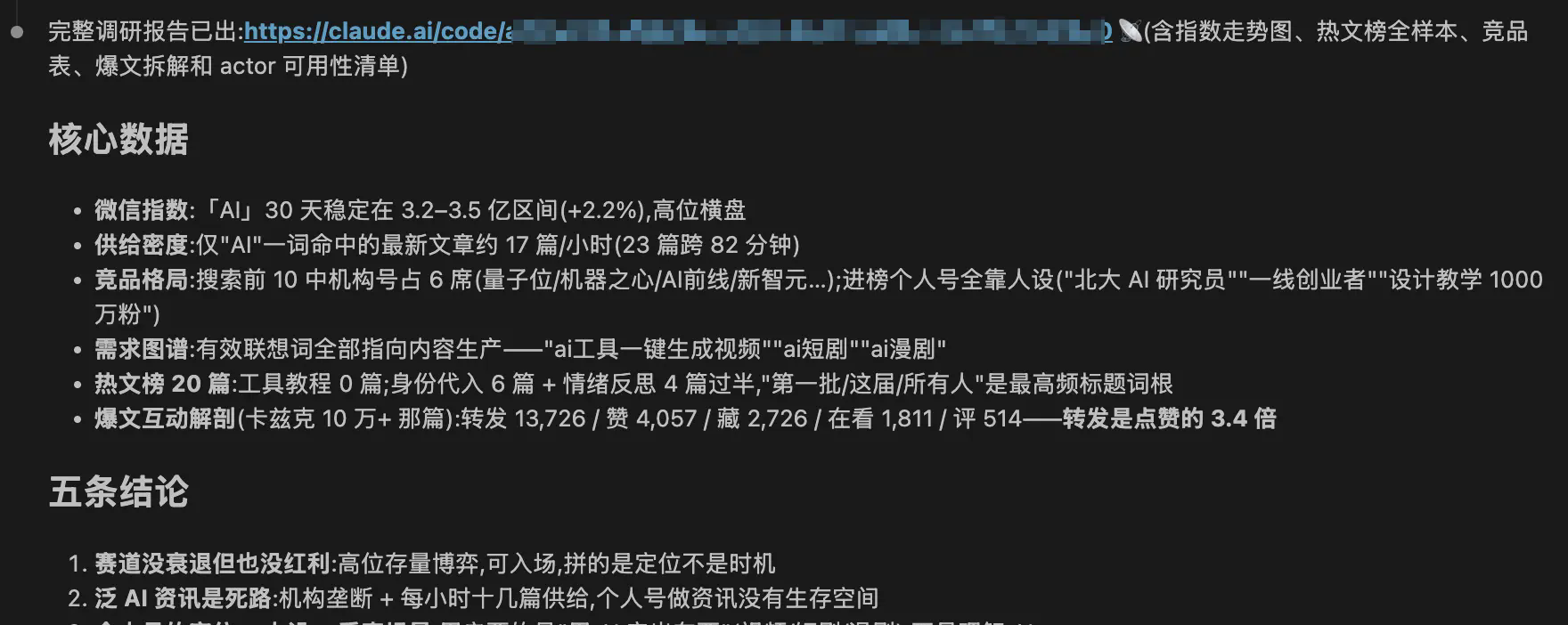
Got: 30-day trend of WeChat index, 20 articles on the HOT hot article list, the top 21 public accounts of competing products, search associated words, and full interactive data (reading/liking/viewing/forwarding/hide/commenting) of a single popular article.
Step 2: Let Claude analyze. It discovered some conclusions that I didn’t expect, such as the sample explosionThe number of retweets is 3.4 times that of likes——The growth engine of public accounts is retweet fission, not likes.
Step 3: Post in one sentence. "Compile the data and conclusions into reports and publish them." Claude generated the HTML with the interactive chart, called the Artifact tool to publish it, and returned the link.
Step 4 (optional): Keep updating. Next week I will change the keywords and re-run the survey, so that it can update the same artifact, the link remains unchanged, and the data can be compared twice in the version history.
The pain points that Artifacts solved during the entire process were very specific: HTML reports generated by AI in the past, or local open index.html See it for yourself, or go through the deployment specifically to show it to others. Now this step is gone.
6. Which scenarios are worth using?
A list of what I think is applicable after actual testing:
- Research/Analysis Report——Data + charts + conclusions, sent to decision-makers
- Technical proposal review page——Much more decent than dumping markdown files in the group
- Bug review/incident report——Timeline + root cause diagram, long-lasting and traceable
- Project progress dashboard——The same URL is updated daily, and it is enough for the team to collect it once
- Front-end demo/prototype——Self-contained interactive page for PM to understand in seconds
Not suitable for: applications that need to adjust the backend interface, public content that requires SEO (it is private by default, and is not prepared for search engines).
7. Summary
Claude Code Artifacts directly cuts out the last mile of "AI generated web pages" - deployment and sharing. For people like me who often have to produce reports for others to see, what it changes is not whether I can do it, butOnce done, you can hand it out easily.
It has been online for almost a month, and the Chinese community is still basically blank. If you are using Claude Code, I suggest you try this sentence today:
Organize what we just talked about into a web page and publish it as artifact
If you have any questions, chat in the comment section.
refer to:
- Official blog: Artifacts in Claude Code (claude.com/blog/artifacts-in-claude-code)
- Claude Code Changelog(code.claude.com/docs/en/changelog.md)